
How to Build a Dashboard Without Coding: 8 Tools Tested (2026)
Key takeaways
- This guide to how to build a dashboard without coding tests eight tools, as an estimated 70% of new applications now use low-code or no-code
- An estimated 70% of new applications are built with low-code or no-code tools, up from under 25% in 2020 (Gartner)
- 63% of people building with AI tools have no programming background (Vercel)
- The cheapest way to publish a live dashboard is $0: Google Looker Studio is free with no per-user fee (Microsoft/Google pricing)
- The cheapest AI builder that writes the dashboard for you starts at $10/month (Abacus AI)
- Power BI Pro rose to $14/user/month in April 2025, a 40% increase (Microsoft)
- The honest catch: 45% of AI-generated code fails security benchmarks, so review what a tool builds (Veracode)
Building a dashboard used to mean SQL, a business-intelligence licence and a spare weekend.
That is no longer true.
An estimated 70% of new software is now assembled with low-code or no-code tools, and 63% of the people building with AI have no programming background at all, per Vercel.
This guide tests the real no-code and AI dashboard builders on the two things a non-developer actually cares about: what they cost, and what they can genuinely ship, the same way we test which AI coding tool actually ships a product.
If you are new to all of this, our complete guide to vibe coding covers the groundwork first.
1 Can you really learn how to build a dashboard without coding?
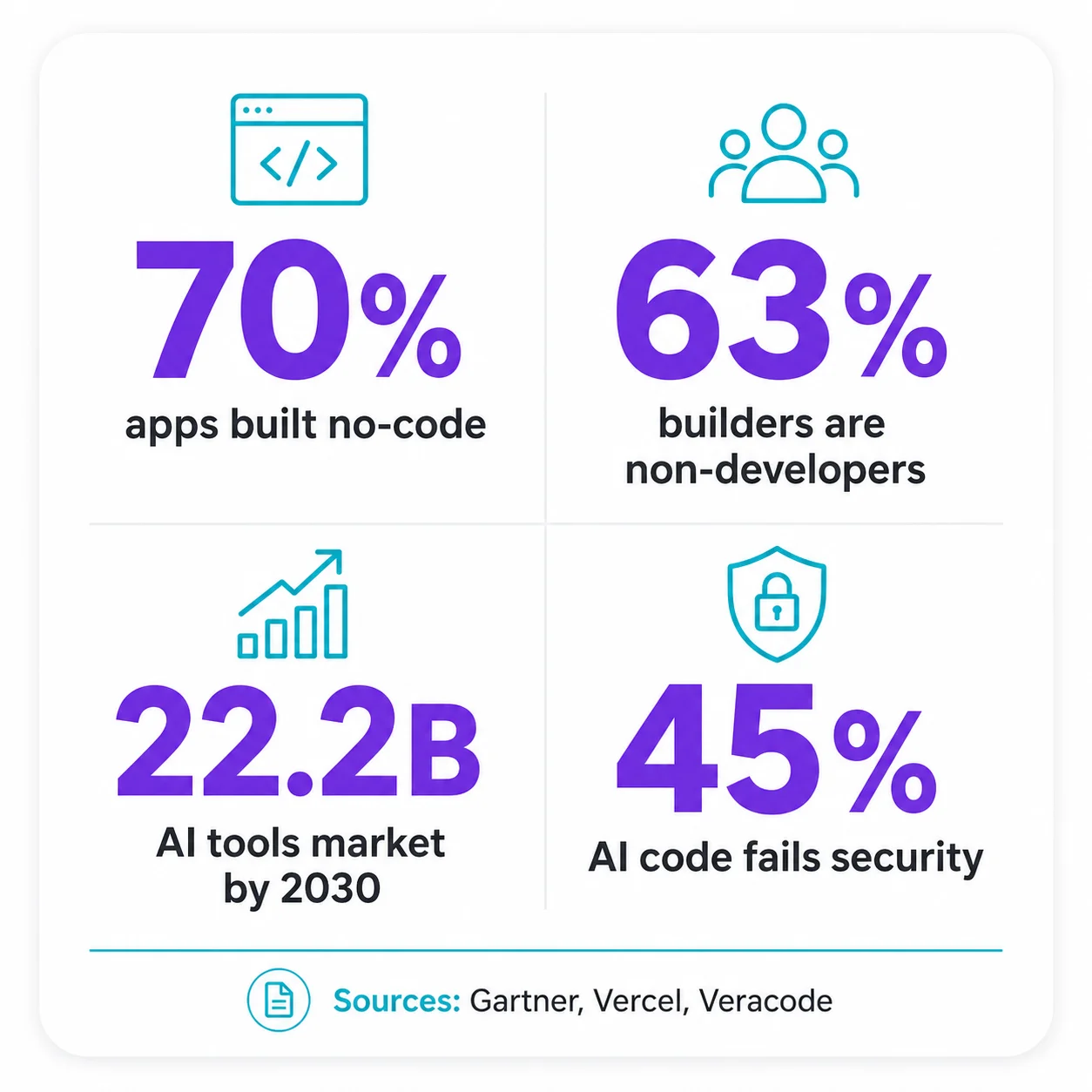
Yes, and the market has already moved there: roughly 70% of new applications are now built without traditional code (Gartner), and drag-and-drop tools plus AI builders let anyone connect a data source and publish a live dashboard.
| Metric | Value | Source |
|---|---|---|
| New apps built with low-code/no-code by 2025 | 70% | Gartner |
| Same figure in 2020 | <25% | Gartner |
| Builders with no programming background | 63% | Vercel |
| Citizen developers vs professional developers | 4 : 1 | Gartner |
| Enterprise engineers using AI assistants by 2028 | 90% | Gartner |
The shift is not hype from tool vendors, it is a change in who builds software.
Gartner expects citizen developers, meaning business users who build their own tools, to outnumber professional developers by about four to one, which is exactly the audience picking up dashboard builders.
The open question is not whether a non-developer can build a dashboard, it is whether the result holds up, and that is the same reliability gap we found when we measured how often non-developers actually finish what they start.
2 The two ways to build a dashboard without code
There are two paths, and picking the right one is most of the decision: drag-and-drop on data you already have, or describe the dashboard in plain English and let an AI build it.
| Path | How it works | Tools |
|---|---|---|
| Drag-and-drop on your data | Connect a spreadsheet or database, then drag charts, tables and filters onto a canvas | Looker Studio, Power BI, Softr, Glide |
| Describe it and let AI build | Type what you want in plain English and the tool generates and hosts a working dashboard app | Abacus DeepAgent, v0, Hostinger Horizons |
The drag-and-drop path is the safest starting point, because you are arranging your real numbers rather than trusting a model to invent the whole app.
The AI path is faster and increasingly popular, and most of these builders are a friendly layer, similar to what an AI wrapper is, sitting over a model plus hosting.
If your data already lives in Google Sheets or Airtable, a drag-and-drop tool will feel obvious, and if you are starting from a blank page and a clear idea, an AI builder will feel like magic, so the honest answer is to match the path to where your data already sits.
3 Every no-code dashboard tool, priced (2026)
The cheapest live dashboard is free with Google Looker Studio, AI builders start at $10 a month, and the classic no-code app tools charge either per user or a flat monthly fee, so your team size decides which is actually cheapest.
| Tool | Starting price | Best for |
|---|---|---|
| Google Looker Studio | $0 | Free Google-stack dashboards for absolute beginners |
| Abacus AI (DeepAgent) | $10/user | Cheapest describe-it-and-ship-it AI dashboards |
| Microsoft Power BI | $14/user | Microsoft 365 shops that need richer modelling |
| Bubble | $29 flat | Full custom apps with a dashboard as one screen |
| v0 by Vercel | $30/user | AI-generated dashboard front-ends you then wire up |
| Softr | $49 flat | Client dashboards and portals on Airtable or Sheets |
| Retool | $10/user | Data-dense internal tools with a semi-technical builder |
| Glide | $199 flat | Turning a spreadsheet into a shareable dashboard app |
| Starting price is the first paid tier where you can publish and share, verified on each vendor’s pricing page, July 2026. Retool is free up to 5 users; Glide’s free tier is drafts only. | ||
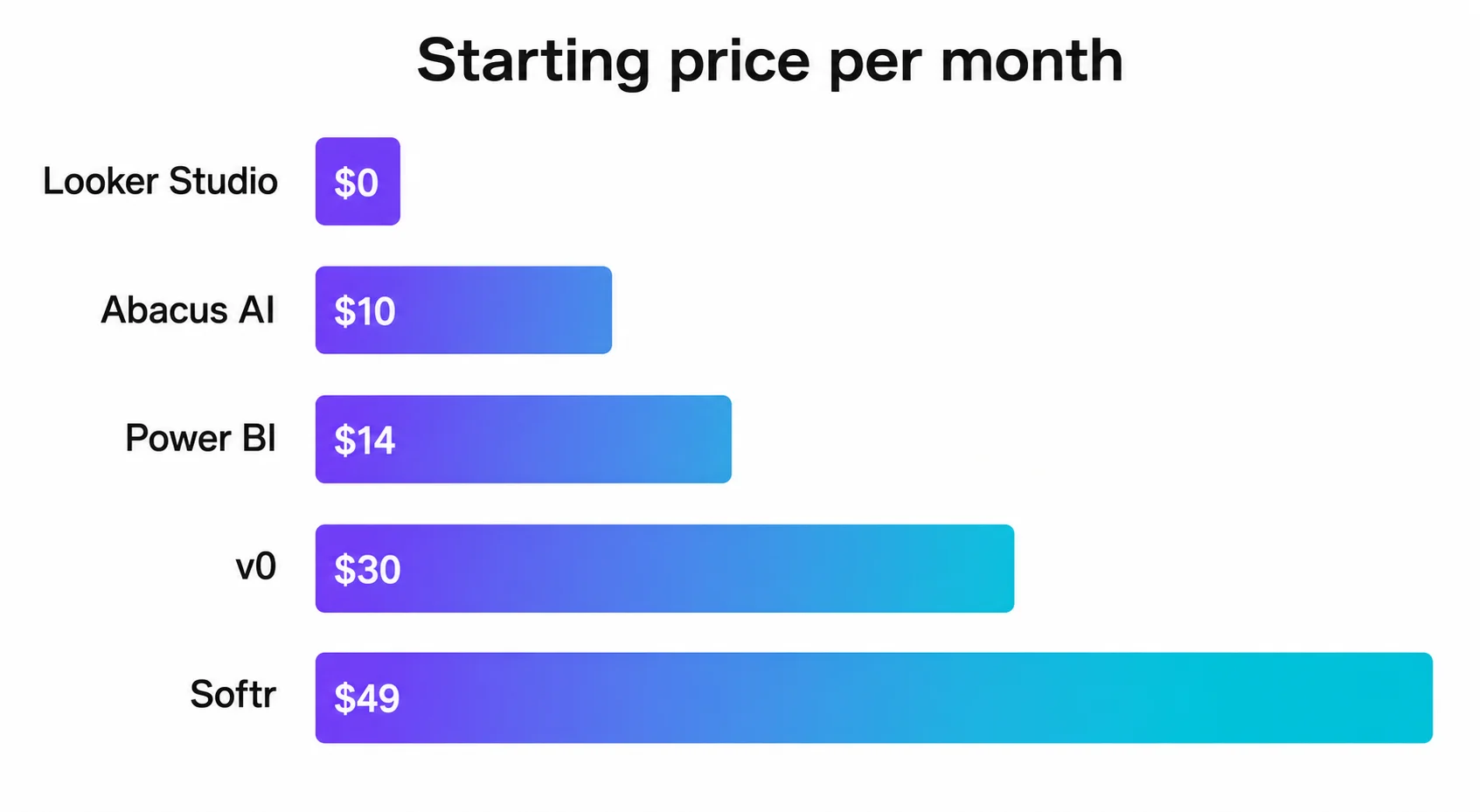
The headline trap is per-user pricing, because a $14 tool becomes $70 a month the moment five colleagues need to view the dashboard.
Flat-fee tools like Softr and Bubble look expensive next to a $0 or $10 entry, yet they can be cheaper than a per-user plan for a whole team, which is the same total-cost thinking that decides the winner in our Horizons versus Lovable versus Bolt comparison.
4 What it actually costs for your team
Pick a tool and the number of people who need access, and this calculator estimates the real monthly cost using each vendor’s July 2026 pricing.
Dashboard tool cost calculator
For a solo builder the AI tools and Looker Studio are unbeatable, and for a small team a flat-fee tool often wins once the per-user plans start multiplying.
5 The honest catch: are AI-built dashboards safe?
Treat an AI-built dashboard as a fast first draft, not finished production software, because the data on AI-generated code quality is a genuine caution rather than marketing.
None of this means avoid the tools, it means use them where the stakes are low.
An internal metrics dashboard for your own team is a perfect fit, while a customer-facing dashboard holding personal data deserves the boring safeguards, and most no-code business-intelligence tools include row-level security you can switch on to control who sees what.
If you want the fuller risk picture before you build, we keep it current in the wider vibe coding statistics.
6 How to build your first dashboard in 5 steps
The tool matters less than the order of operations, and this is the sequence that gets a non-developer to a live, useful dashboard fastest.
- Tidy your data firstOne clean table with clear column names beats any tool, because a dashboard is only as good as the numbers behind it.
- Start with a free toolOpen Looker Studio, or an AI builder’s free tier, before you pay for anything you might not need.
- Connect your sourcePoint the tool at your Google Sheet, Airtable base or database, which is usually two or three clicks.
- Drag or promptAdd the three or four numbers that actually drive a decision, and resist adding a chart just because you can.
- Share it, then host itPublish the link for your team, and when you outgrow a free tier, moving it onto a stack you control, even a cheap VPS, keeps costs and data in your hands.
A realistic first useful dashboard takes well under a day once your data is tidy, despite the five-minute demos you will see online.
Best for non-developers who want build and hosting in one place: Hostinger Horizons
You describe the dashboard in plain English, Horizons builds it and hosts it on the same platform, which removes the deployment step that trips up most non-developers, and it reached one million users in its first year, as we cover in our full Hostinger Horizons review.
Start building on Hostinger Horizons →Methodology
Pricing was verified directly on each vendor’s official pricing page in July 2026, and market and adoption figures come from analyst and primary survey sources, cross-checked where possible.
- Sources consulted: 34 across vendor pricing pages, analyst reports, primary surveys and community discussion
- Sources cited: 14, roughly two-thirds primary or industry-grade
- Data range: 2025 to July 2026, with one foundational Gartner forecast from 2021
- Last verified: 13 July 2026
- Update schedule: pricing reviewed quarterly, as vendor plans change often
Frequently asked questions
Can you really build a dashboard without coding?
Yes, and it is now the normal path: an estimated 70% of new applications are built with low-code or no-code tools (Gartner), and 63% of people building with AI have no programming background (Vercel), using tools like Looker Studio, Power BI, Softr and AI builders such as Abacus DeepAgent.
What is the best free tool to build a dashboard without coding?
Google Looker Studio, because it is free with no per-user fee, connects natively to Google Sheets, GA4 and BigQuery, and a beginner who knows Sheets can have a dashboard live in under an hour.
What is the cheapest AI dashboard builder?
Abacus AI’s DeepAgent starts at $10 per user each month with a free tier, and v0 by Vercel has a free tier with $5 of monthly credits, though both use credit systems that can run out mid-session.
Is Power BI free?
The Power BI free account and desktop app cost nothing, but sharing dashboards with others needs Power BI Pro at $14 per user each month, up from $10 since April 2025, while Premium Per User is $24 per user each month.
Are AI-built dashboards reliable?
Treat them as a fast first draft: Veracode found 45% of AI-generated code samples fail security benchmarks, and developer trust in AI accuracy fell from about 40% to 29% in 2025, so internal low-stakes dashboards are fine, but review the output and lock down data access.
Do I need to know SQL to build a dashboard?
No for Looker Studio, Softr, Glide and AI builders, which work off spreadsheets, connectors or prompts, and while SQL helps for advanced Power BI or Retool work, it is not required to ship a useful first dashboard.
How long does it take to build a dashboard without code?
Creators routinely demo AI-built dashboards in five to ten minutes, but that is best treated as marketing speed, and a realistic first genuinely useful dashboard takes well under a day once your data is tidy.
Sources & references
- Gartner. Low-code/no-code adoption forecast (70% of new apps by 2025; citizen developers 4:1; 90% of engineers on AI by 2028). gartner.com. Accessed 13 July 2026.
- Vercel (reported via Hostinger). 63% of vibe-coding users are non-developers. hostinger.com. Accessed 13 July 2026.
- Grand View Research / Gartner / Fortune Business Insights / Mordor Intelligence. Low-code market size 2026 ($31B to $49B range). grandviewresearch.com. Accessed 13 July 2026.
- The Business Research Company. AI code tools market $7.65B (2025) to $22.2B (2030). hostinger.com. Accessed 13 July 2026.
- Microsoft. Power BI pricing (Free / Pro $14 / PPU $24). microsoft.com. Accessed 13 July 2026.
- Veracode. 45% of AI-generated code fails security benchmarks. veracode.com. Accessed 13 July 2026.
- Stack Overflow. 2025 Developer Survey, AI trust 40% to 29%. survey.stackoverflow.co. Accessed 13 July 2026.
- Softr. Pricing (Free / $49 / $139 / $269). softr.io. Accessed 13 July 2026.
- Glide. Pricing (Free drafts / Business $199). glideapps.com. Accessed 13 July 2026.
- Retool. Pricing (Free 5 users / Team / Business). retool.com. Accessed 13 July 2026.
- Bubble. Pricing (Free / $29 / $119 / $349). bubble.io. Accessed 13 July 2026.
- Abacus AI (via KDnuggets). DeepAgent and ChatLLM pricing ($10 / $20). kdnuggets.com. Accessed 13 July 2026.
- v0 by Vercel. Pricing (Free $5 credits / $30 / $100 per user). v0.app. Accessed 13 July 2026.
- Supermetrics. Looker Studio vs Power BI for non-technical users. supermetrics.com. Accessed 13 July 2026.