
I Built a GTA 6 Companion Tool Without Writing Code (And the 5 Prompts I Used)
Key Takeaways
- → A game launch is a demand spike with a date on it, which is the rarest thing in content: a deadline you can plan a build around
- → The GTA 6 companion tool in this article is live and free, built as a single self-contained HTML file with no framework and no backend
- → Pre-launch you can only build tools that need no game data, which rules out stat trackers and rules in planners, checklists and crew tools
- → The two bugs that cost the most time were both environment bugs, not code bugs, and neither showed up until the page was served properly
- → Shipping to a real address is the step most vibe coders skip, and a tool nobody can open is the same as a tool that was never built
What is in this article
1Why a launch window is the cheapest way into a community
Most content advice asks you to find an audience first.
A game launch hands you one, already assembled, already talking, and already complaining about the same three missing things in every thread.
The pattern is old and it is boring, which is exactly why it keeps working.
Somebody builds an interactive map, a build calculator, a loot tracker or a crew organiser, posts it in the community, and inherits the traffic of a game that a publisher spent hundreds of millions of pounds marketing.
The interesting part in 2026 is that the build cost has collapsed.
You are not competing with studios here.
You are competing with the fact that nobody else has bothered yet.
2What I actually built: a GTA 6 companion tool
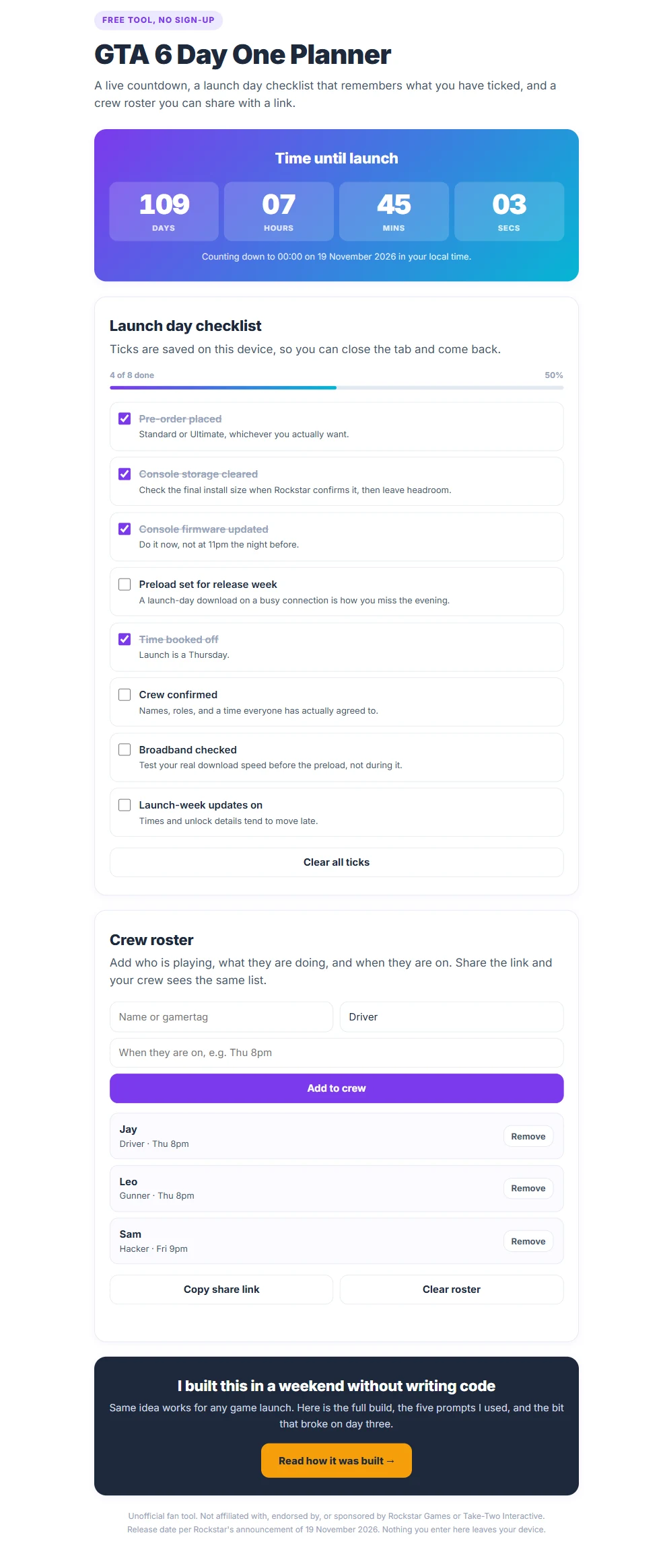
I built a day one planner, and it is live and free with no sign-up: open the GTA 6 Day One Planner.
It does three things.
It counts down to midnight on 19 November 2026 in your local time, it holds a launch day checklist that remembers what you have ticked when you close the tab, and it holds a crew roster you can share with a link so your friends open the same list.
That is a deliberately small feature list.
The three features have one thing in common, which is that none of them need a single byte of data from the game.
This is the constraint most people miss when they plan a pre-launch companion tool.
A stat tracker cannot track stats that do not exist yet, and a garage builder cannot list vehicles nobody has seen, so anything data-dependent is a post-launch build no matter how good your prompt is.
| Tool idea | Buildable before launch? | Why |
|---|---|---|
| Countdown | Yes | Needs a date, and the date is public |
| Launch day checklist | Yes | Preload, storage and firmware are console facts, not game facts |
| Crew roster and session planner | Yes | The data is your friends, not the game |
| Soundtrack ranker | Yes | Users supply their own track list |
| Stat tracker | No | No stat fields exist until the game ships |
| Garage or vehicle builder | No | Vehicle classes and values are unknown |
| Interactive map | No | Needs the actual map |
Building the left column now and the right column on launch day is not a compromise.
It is the whole strategy, because the pre-launch tools are what earn you the audience that shows up for the post-launch ones.
3The five prompts
Here is the prompt that produced the planner, in full, exactly as it was run.
Three details in that prompt are doing most of the work.
Naming the storage mechanism, localStorage, stops the tool inventing an account system you do not want.
Saying “no frameworks, no external files” is what keeps the output to one file you can paste anywhere, including a WordPress block.
Saying “no game artwork” matters for a reason that has nothing to do with design, which is that fan tools get taken down for using publisher assets, not for existing.
The other four prompts build the stat tracker, the garage builder, the soundtrack picker and the one I reach for when a build breaks.
I will be straight about their status, because this site does not pretend.
Prompt one is proven, since the tool it produced is the one linked above, and the other four are written to the same specification but two of them cannot be finished until the game exposes real data on 19 November.
Send me the five prompts
All five prompts, copy and paste ready, plus the deploy checklist for getting the result onto a real address.
On 19 November I will send the finished toolkit with the launch data wired in.
One email now, one in three days, one on launch day, and you can unsubscribe in a click.
4What broke, and how I found it
Neither of the two real problems was a coding mistake, which is the part worth learning.
The share link that was silently broken
The crew roster encodes itself into the URL, so testing it means opening that URL and checking the roster comes back.
Opening the file directly from my desktop, the roster came back every time.
It came back because the page was still holding the old roster in memory, and the query string I thought I was testing was being dropped before the page ever saw it.
The feature was broken and every test said it passed.
It only surfaced when the page was served over a real address instead of opened as a file, at which point the query string arrived intact and the decode ran for the first time.
The saved data that appeared to vanish
The second one follows from the first.
Browser storage is scoped to the origin, so data saved while opening the file directly is invisible once the same page is served over a web address.
Nothing was lost and nothing was buggy, but for about a minute it looked like the save feature had failed completely.
Both of these are the kind of problem an AI coding tool will not solve for you, because from the code’s point of view there is nothing wrong.
That is why the fifth prompt in the pack is a debugging prompt rather than a building one, and why it forbids the tool from rewriting anything until it has told you what it thinks is failing.
5Getting it off your laptop
This is where most vibe coded projects quietly end.
The build works, the preview link looks fine, and then the preview link expires or the free subdomain looks untrustworthy to the exact friends you were trying to send it to.
For the planner the requirement is genuinely small, because it is one file with no server side at all.
The moment you add anything shared, a leaderboard, saved sessions that follow a person across devices, or a login, you have crossed from static hosting into needing your own server.
Hostinger
Shared hosting for the static pages, and a VPS for anything that has to keep running unattended, which for me includes leaving Claude Code working on a long build after I have shut the laptop.
See the plans →Affiliate link, which costs you nothing extra and pays for the tools I test.
Whatever you use, the rule holds.
Ship the small thing to a real address before you add a single extra feature, because a tool nobody can open is indistinguishable from a tool that was never built.
6Doing this for any launch
The toolkit is not the point.
The repeatable part is the sequence, and it works for a game, a console, a phone, a film or any dated event with a community attached.
Find the launch and its confirmed date, read the community threads until you can name the three things people keep asking for, and pick the one that needs no data from the product itself.
Build that one as a single page, ship it to a real address, and post it where the question was being asked.
Then build the data-dependent version on launch day, when everyone else is still deciding whether to start.
If you are not sure which tool to build with, the Tool Finder Quiz narrows eight of them down to one in about a minute.
Frequently asked questions
Do I need to know how to code to build a companion tool?
No, and the planner linked above was produced from a single prompt with no code written by hand.
What you do need is the ability to describe the tool precisely, including where data is stored and what the page must not do, because vague prompts produce vague tools.
Is it legal to build a fan tool for a game?
Unofficial fan tools are common and generally tolerated, but the line most takedowns cross is the use of publisher assets.
Do not use logos, artwork, fonts, screenshots or ripped data, do not imply any official connection, and state clearly that the tool is unofficial.
Why not build the stat tracker now and fill in the data later?
You can scaffold it, and the prompt in the pack does exactly that with manual entry and a JSON import.
What you cannot do is design the fields, because you do not yet know what the game exposes, and rebuilding around real fields is usually faster than retrofitting a guess.
What does it cost to run something like this?
A single self-contained page is static, so it runs on the cheapest hosting tier that exists plus a domain.
Costs only start climbing when you add a server, a database or anything that stores other people’s data.
How long did the planner actually take?
An afternoon, including the two environment bugs described above, which took longer to diagnose than the entire build took to generate.
That ratio is normal, and it is why the debugging prompt is in the pack.
Sources
- Vice, Take-Two CEO confirms GTA 6 will not be delayed again
- Forbes, Grand Theft Auto 6 release date and everything confirmed
This is an unofficial fan project.
It is not affiliated with, endorsed by, or sponsored by Rockstar Games or Take-Two Interactive.
Grand Theft Auto is a trademark of its respective owner and is referred to here descriptively only.