
What Is MCP? The Plain-English Guide for People Who Don’t Code
What is MCP? MCP stands for Model Context Protocol. It’s an open standard that lets an AI assistant like Claude or ChatGPT plug into tools you already use — your Notion, your calendar, your customer records — without anyone writing a custom integration for each one. The protocol’s own documentation puts it best: “Think of MCP like a USB-C port for AI applications.”
Three letters turn up everywhere in AI tooling now, usually with no explanation attached. So: what is MCP, who controls it, and should you wire your business to it?
What is MCP, and what does it stand for?
MCP stands for Model Context Protocol. The official definition, from the protocol’s own site, is:
“MCP (Model Context Protocol) is an open-source standard for connecting AI applications to external systems.”
Three words, three jobs. Model — the AI. Context — what the AI needs to know that isn’t in its training data: your documents, your customer list, today’s figures. Protocol — an agreed way for the two to talk, so anyone can build either side and expect it to work.
That last word is the one most explanations skip, and it’s the one that matters.
What is MCP actually solving?
Before MCP, every connection between an AI tool and an outside service was built by hand, one pair at a time. Anthropic put the problem plainly at launch: “Every new data source requires its own custom implementation, making truly connected systems difficult to scale.”
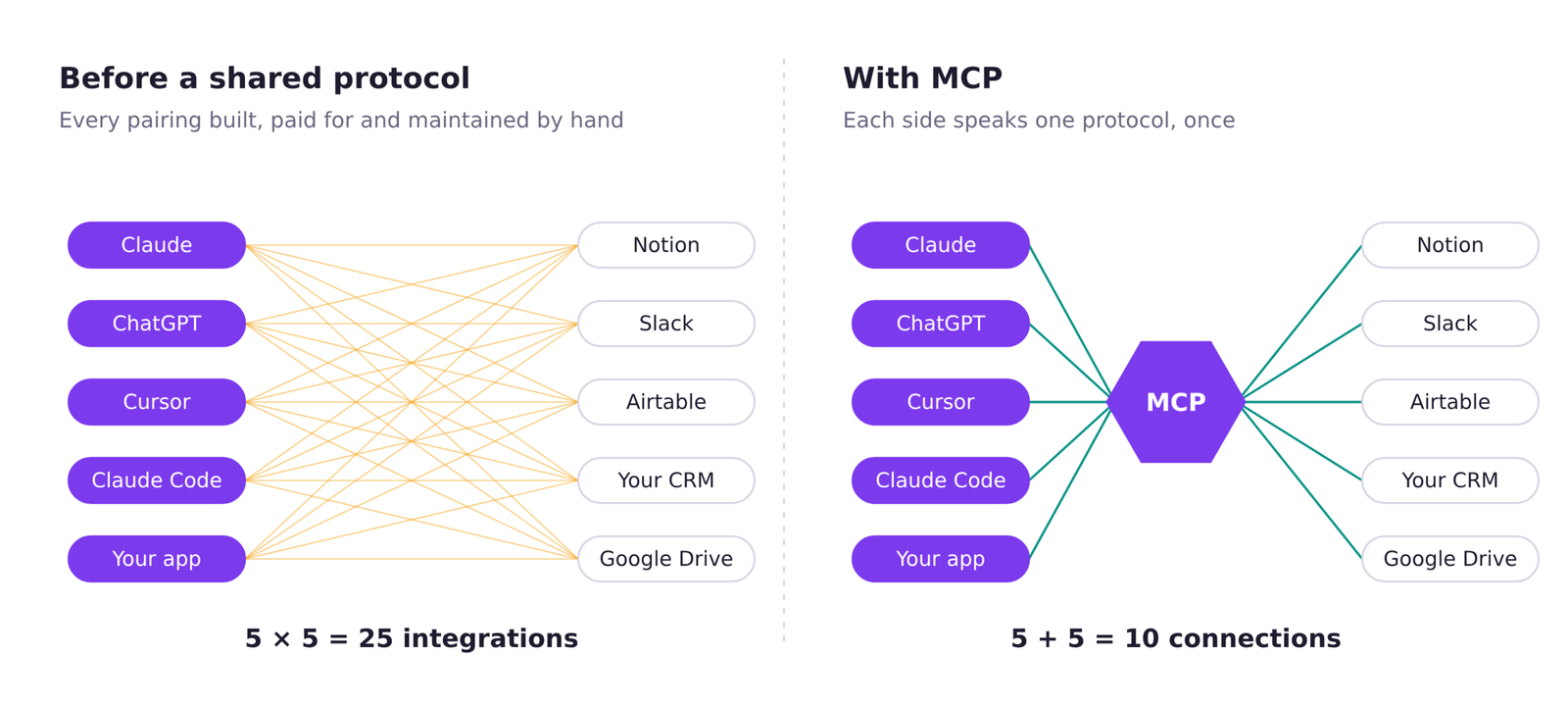
Five AI apps and five services is twenty-five separate integrations, each built, paid for and maintained separately. Add a sixth service and you’re building five more.
A protocol collapses that. Each AI app learns the protocol once, each service speaks it once, and now anything talks to anything — which is what the USB-C comparison is getting at. You don’t buy a different cable per laptop, because everyone agreed on the shape of the socket.
The practical effect for you: the integration you want probably already exists, and connecting it is a settings screen rather than a project.
What is an MCP server?
This term trips people up, because “server” sounds like something you rent or run. You don’t.
An MCP server is software that exposes one service to AI tools in that shared format. The Notion server reaches your Notion; the Airtable one does Airtable. Almost always the company behind the service runs it, and you just point your AI tool at a web address.
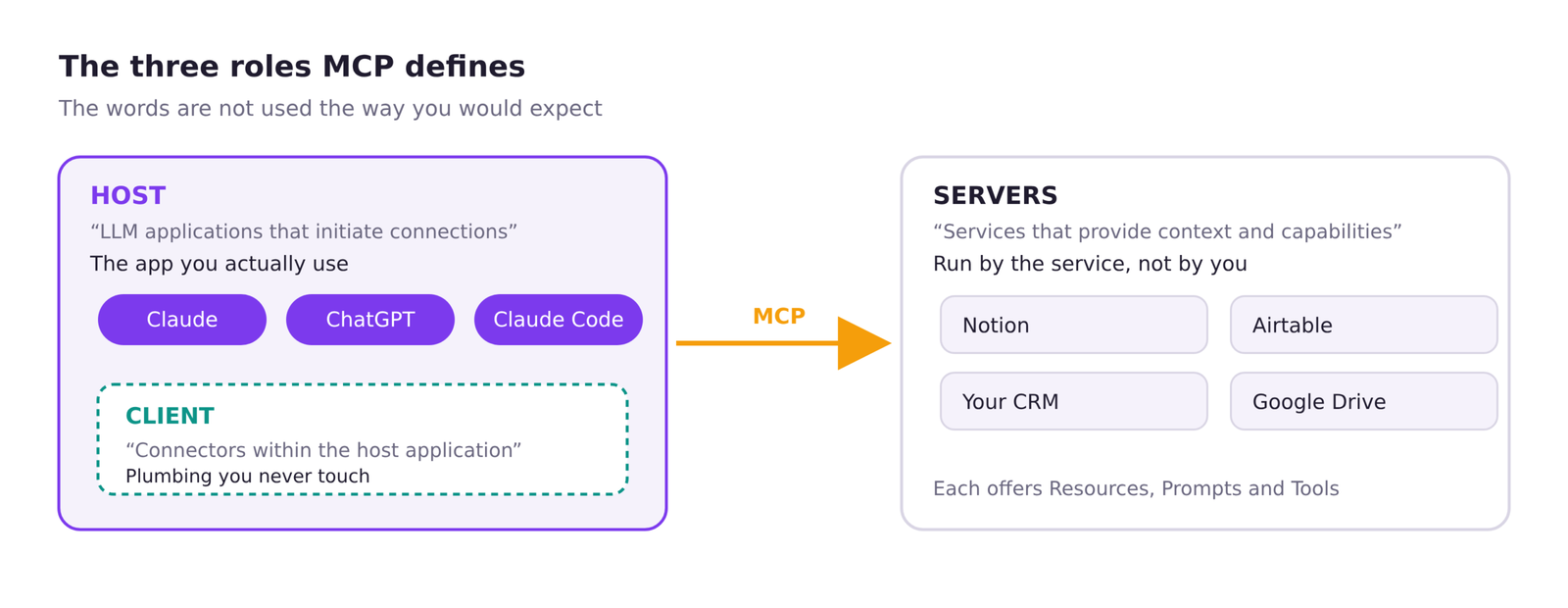
The specification names three roles, and the words aren’t used the way you’d expect:
- Hosts — “LLM applications that initiate connections”. The app you’re using: Claude, ChatGPT, Claude Code.
- Clients — “Connectors within the host application”. Internal plumbing you’ll never touch.
- Servers — “Services that provide context and capabilities”. Notion, your CRM, your file store.
So “add an MCP server” means connect a service. Nothing is installed on your machine in the normal case, and nothing is hosted by you.
A connected server can offer three things: Resources (information the AI can read), Prompts (ready-made instructions) and Tools (actions it can take on your behalf). Tools are the powerful ones, and the ones to watch.
MCP vs API: what’s actually different?
APIs have let software talk to software for decades, and this doesn’t replace them — most servers wrap an API that already existed. What changes is who the interface is built for.
| A traditional API | MCP | |
|---|---|---|
| Designed for | A developer writing code | An AI model deciding what to do |
| Who connects it | Someone who can program | You, from a settings screen |
| Describes itself? | No — you read the documentation | Yes — the server tells the AI what it can do |
| Reusable across apps | No, each app needs its own integration | Yes, any MCP-capable app can use it |
| Work to add a service | A development project | Usually a URL and a sign-in |
The self-describing part is the real shift. A traditional API waits silently for correctly formatted requests. An MCP server announces its own capabilities, so the AI works out what’s available without a human first translating the documentation into code.
That is why this matters to people who don’t code. It moved integration out of the development queue and onto a settings page.
Who controls MCP now?
Here’s the part almost nobody knows, and the most useful fact here if you’re deciding whether to build on it.
Anthropic created the standard and announced it on 25 November 2024, open-sourced from day one, built by David Soria Parra and Justin Spahr-Summers. Early backers included Block and Apollo, with Zed, Replit, Codeium and Sourcegraph named as working with it, plus ready-made servers for Google Drive, Slack, GitHub, Git, Postgres and Puppeteer.
But MCP is not Anthropic’s project any more. Its governance page states:
“Model Context Protocol has been established as Model Context Protocol a Series of LF Projects, LLC.”
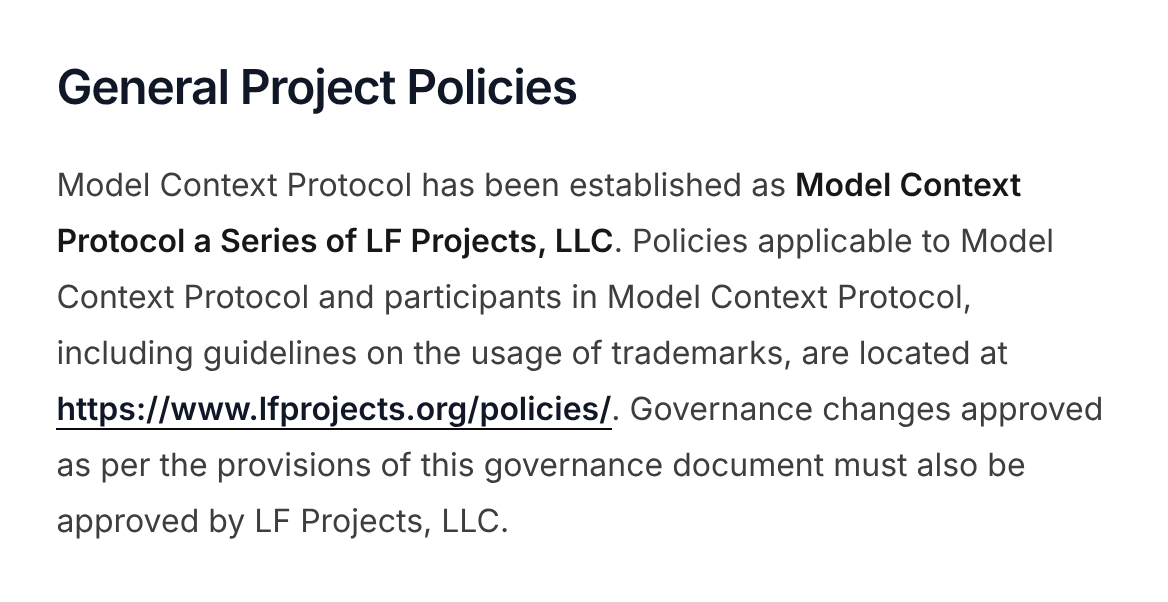
That is the Linux Foundation — the same neutral home as Linux and Kubernetes. Code and specification contributions are licensed Apache 2.0, documentation CC BY 4.0, and a Steering Group of Lead and Core Maintainers meets fortnightly to vote on proposals. One line settles the “is this a vendor land-grab?” question:
“Membership in the technical governance process is for individuals, not companies. That is, there are no seats reserved for specific companies.”
The page doesn’t say when the transfer happened and doesn’t mention Anthropic at all, so we won’t guess at a timeline. What it establishes is enough: no single AI company can take MCP away or steer it alone.
Which AI tools support it?
Enough that “which don’t” is the shorter list. From each vendor’s own documentation:
- Claude apps — custom connectors are “available on Claude, Cowork, and Claude Desktop for users on Free, Pro, Max, Ultra, Team, and Enterprise plans”, though “Free users are limited to one custom connector.”
- Claude Code — its documentation says it “can connect to hundreds of external tools and data sources through the Model Context Protocol (MCP)”, with a browsable Anthropic Directory of reviewed connectors.
- ChatGPT and Codex — OpenAI’s developer documentation calls MCP “an open protocol that’s becoming the industry standard for extending AI models”, available “through a plugin in ChatGPT and Codex”.
A competitor calling a rival’s standard the industry standard is about as strong an adoption signal as you get.
What is MCP like to set up?
Two paths, neither needing a terminal.
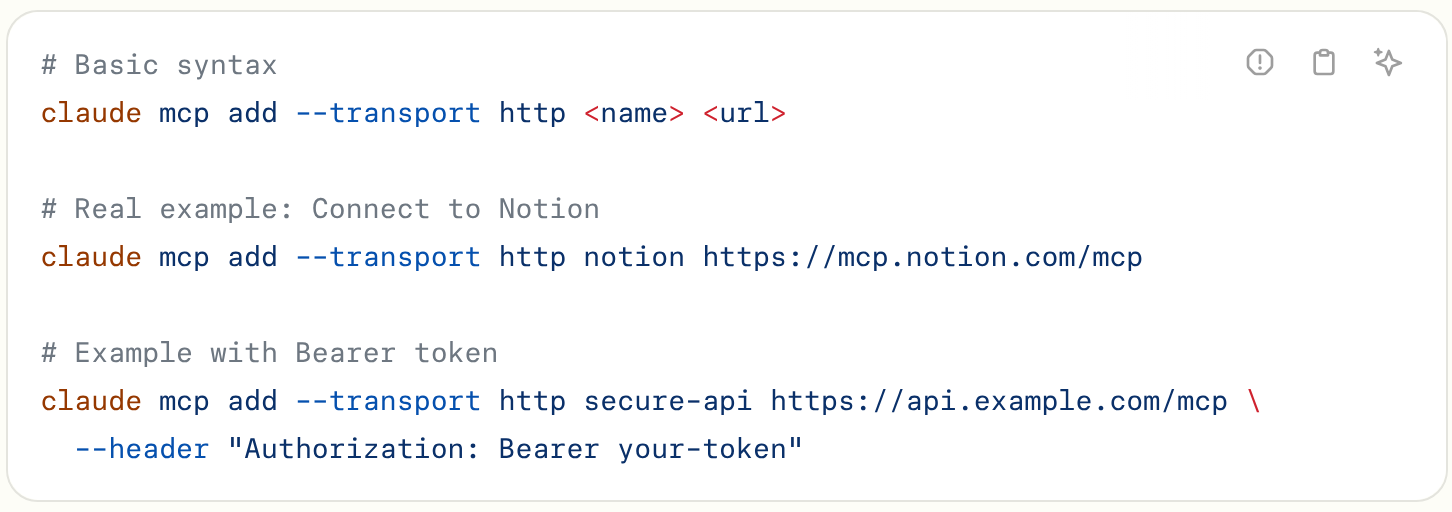
In the Claude apps. One thing to know before you start: this has moved. Connectors now live on the Plugins screen, alongside skills and marketplaces. Anthropic’s support documentation still describes the old Customize → Connectors route, so expect the docs and the app to disagree for a while — the steps themselves are unchanged.
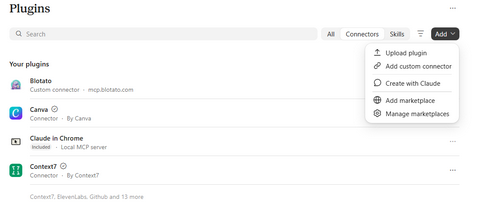
- Open Plugins. The tabs across the top are All, Connectors and Skills, and your existing ones are listed under Your plugins.
- Click Add. The menu offers Add custom connector — that’s the one. (Upload plugin, Create with Claude and Add marketplace are different jobs.)
- Give it a name and paste the server’s address. The field wants “The HTTPS address where the server accepts MCP requests” — take it from the service’s own documentation, never from a third party.
- Read the warning in that dialog before you click Continue. It’s quoted in full further down, and it is the single most important sentence in this process.
- Work through the sign-in and OAuth screens that follow. The default — “Use Claude’s published identity (Recommended)” — is the right answer unless you have a specific reason otherwise.
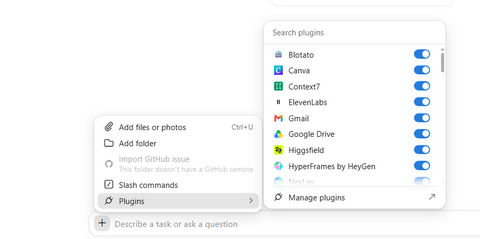
- Switch it on per conversation from the + button in the composer, under Plugins, where each one has its own toggle.
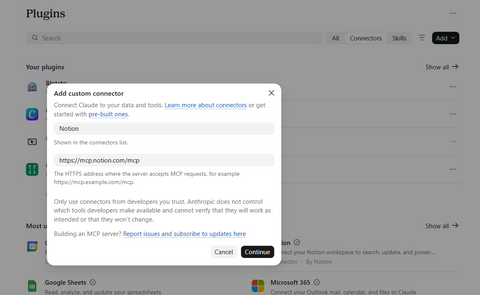
To remove one later, the same Plugins screen has the option behind the three dots.
In ChatGPT, OpenAI’s flow is “Go to ChatGPT Plugins, select the plus button, then Add custom MCP server”, then the URL and authentication, accept the risk warning, and create it as a plugin.
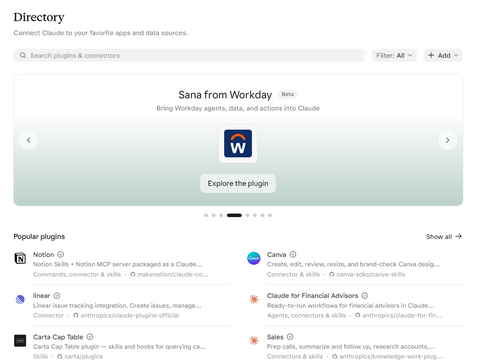
Check the directory before adding anything custom. Claude Code’s docs point to a vetted list — “Browse reviewed connectors in the Anthropic Directory” — and those entries work across Claude. The Directory now covers plugins and connectors together, with the popular ones surfaced first. A reviewed listing is a far safer starting point than a URL someone posted on X.
What can go wrong
A guide that only sold you the upside would stop here. The specification is blunt about the trade-off:
“The Model Context Protocol enables powerful capabilities through arbitrary data access and code execution paths.”
And on Tools specifically: “Tools represent arbitrary code execution and must be treated with appropriate caution.”
Claude puts the same point in front of you at the moment you add one, in the dialog itself:
“Only use connectors from developers you trust. Anthropic does not control which tools developers make available and cannot verify that they will work as intended or that they won’t change.”
Read that last clause twice. It is not only about whether a server is trustworthy today — it is about whether it stays that way.
Three risks worth holding on to:
- A server is a third party with live access. Anthropic’s support documentation says custom connectors “allow you to connect Claude to services that haven’t been verified by Anthropic”, and to “Only connect Claude to servers built and hosted by organizations and applications you trust.” OpenAI says the same of its own: they “are not developed or verified by OpenAI, and are third-party services.” Nobody is checking these for you.
- A server can send instructions, not just data. In Anthropic’s words, “Malicious MCP servers may include hidden instructions that try to make Claude perform unintended actions.” Claude Code’s docs flag that “Servers that fetch external content can expose you to prompt injection risk.” This got sharper recently: servers can now ship written guidance alongside their tools, which we covered in what an MCP server can now tell Claude to do.
- Standing approvals catch people out. The spec says “Hosts must obtain explicit user consent before invoking any tool” — but consent given once covers a lot of later activity. Anthropic’s advice is to “only click ‘Allow always’ when using a server and tool that you trust to run unsupervised.” That last word is doing the work.
None of this is a reason to avoid the technology. It’s a reason to connect deliberately: official servers, from the directory where possible, approved per action until you know what a server does.
What is MCP worth to you?
- Building an app people pay for: Yes, eventually. The moment your AI tool needs real customer or product data rather than what you paste into a chat, this is the mechanism.
- An internal tool for your business: The strongest case. Connecting AI to the systems your team already lives in is most of the value, and it’s the least risky place to start.
- A website or landing page: Not yet. Static sites don’t need live data access.
- Learning: Connect one official server to something low-stakes and watch what it does. Half an hour there beats any article, this one included.
- No idea yet: Nothing to do. Start with the 60-second quiz.
Our take
Most “open standards” in software are one company’s product with a licence stapled on. This one genuinely isn’t — Linux Foundation, Apache 2.0, governance that explicitly refuses company seats, and a direct competitor calling it the industry standard in its own docs. That combination is rare enough to notice, and it’s why we’d build on it rather than wait to see which vendor wins.
What we’d be careful about is the gap between how easy a server is to connect and how much it can do once connected. Adding one takes two minutes and a URL. Understanding what you just handed it access to takes longer, and nothing in the interface makes you do that part. Start with reviewed connectors, approve tools individually, and treat a server URL from an unofficial source the way you’d treat an unexpected email attachment.
—
Not sure which AI coding tool fits what you’re building? Take the 60-second Tool Finder quiz →
Want the deeper dive on the tool most people meet MCP through? Read our Claude Code guide.
Some links on this page are affiliate links. If you buy through them we may earn a commission at no extra cost to you.
FAQ
What is MCP in simple terms?
It is a shared standard that lets AI assistants plug into outside services. Rather than someone building a custom integration between each AI app and each service, both sides speak one protocol — so any MCP-capable AI can use any MCP server.
What is MCP used for?
Giving an AI assistant live access to real systems: reading your documents, checking your calendar, updating a record in your CRM. It replaces copying and pasting context into a chat window with a direct, permissioned connection.
What is an MCP server, and do I need to run one?
An MCP server is software exposing one service, like Notion or Airtable, to AI tools. You almost never run one. The service provider hosts it and you connect by pasting a web address into your AI app’s settings.
Is MCP owned by Anthropic?
No, not any more. Anthropic created MCP and announced it on 25 November 2024, but its governance page states it is now established as “Model Context Protocol a Series of LF Projects, LLC” — part of the Linux Foundation — under Apache 2.0, with no governance seats reserved for any company.
What is the difference between MCP and an API?
An API is built for a developer to write code against. MCP is built for an AI model to use directly, and an MCP server describes its own capabilities so the AI can work out what is possible. Most MCP servers wrap an existing API.