Vibe Coding Guide 2026: How to Build Your First App
In February 2025, Andrej Karpathy — former Director of AI at Tesla and OpenAI — tweeted something that would fundamentally change how millions of people think about software development. He described building an entire application using only natural-language prompts, directing an AI coding assistant through conversation rather than writing code manually.
Within days, developers worldwide were experimenting with this approach. Within weeks, the term “vibe coding” had exploded across tech communities, Reddit threads, and LinkedIn feeds.
By mid-2025, it became clear: we were witnessing the fastest-ever shift in programming methodology. But here’s what makes vibe coding genuinely revolutionary—it’s not just about experienced developers building faster.
It’s about graphic designers shipping their first web apps. It’s about entrepreneurs launching SaaS products without hiring engineers.
It’s about product managers prototyping features in hours instead of waiting weeks for developer bandwidth. Vibe coding represents the most dramatic democratisation of software creation we’ve ever seen, and if you’re reading this guide in 2026, you’re still early enough to ride this wave.
What You’ll Learn in This Complete Guide to Vibe Coding
By the time you finish this guide to vibe coding, you’ll have everything you need to build production-ready applications using AI coding assistants. Here’s exactly what we’ll cover:
- What vibe coding actually is and why it’s fundamentally different from traditional programming or low-code platforms
- How to choose the right AI coding tools for your specific projects (we compare all seven major platforms)
- The exact step-by-step tutorial to build your first fully functional vibe-coded application in 30 minutes
- Advanced prompt engineering techniques that separate amateur vibe coders from professionals shipping real products
- Production-ready best practices from developers who’ve already deployed vibe-coded apps handling thousands of users
- Security vulnerabilities to watch for in AI-generated code (62% contain flaws—here’s how to catch them)
- Common expensive mistakes and the specific strategies to avoid them
Who This Guide Is For
This vibe coding tutorial is designed for audiences of all levels, whether you’ve never coded before or you’re a seasoned engineer.
Complete beginners who’ve never written a line of code but have an app idea burning in their mind will learn how natural language programming makes software development accessible without years of studying syntax.
Traditional developers who are curious (or skeptical) about AI-assisted coding will discover how vibe coding can 3-5x your productivity for specific tasks while understanding its real limitations.
Entrepreneurs and founders who need to validate ideas quickly without burning capital on development costs will learn which tools let you build genuine MVPs, not just mockups.
Product managers and designers who want to prototype features themselves, rather than writing specs and waiting for dev cycles, will understand how to translate product vision into working software through effective prompting.
Technical leaders evaluating whether their teams should adopt AI coding assistants will get the honest assessment of when Vibe coding accelerates delivery and when it introduces risk.
If you fall into any of these categories, you’re in the right place. Let’s start with the fundamental question everyone asks first.
WHAT IS VIBE CODING?
The Origin Story: From Andrej Karpathy to Global Phenomenon
The term “vibe coding” emerged from a single tweet, but the technology behind it had been brewing for years. Andrej Karpathy, known for his work on Tesla’s Autopilot and as a founding member of OpenAI, casually mentioned in February 2025 that he’d spent the weekend building a complete web application without writing traditional code.
Instead, he’d conversed with an AI coding assistant in plain English, describing what he wanted the app to do. The AI translated his intentions into functional code, which Karpathy would then test, critique, and refine through further conversation.
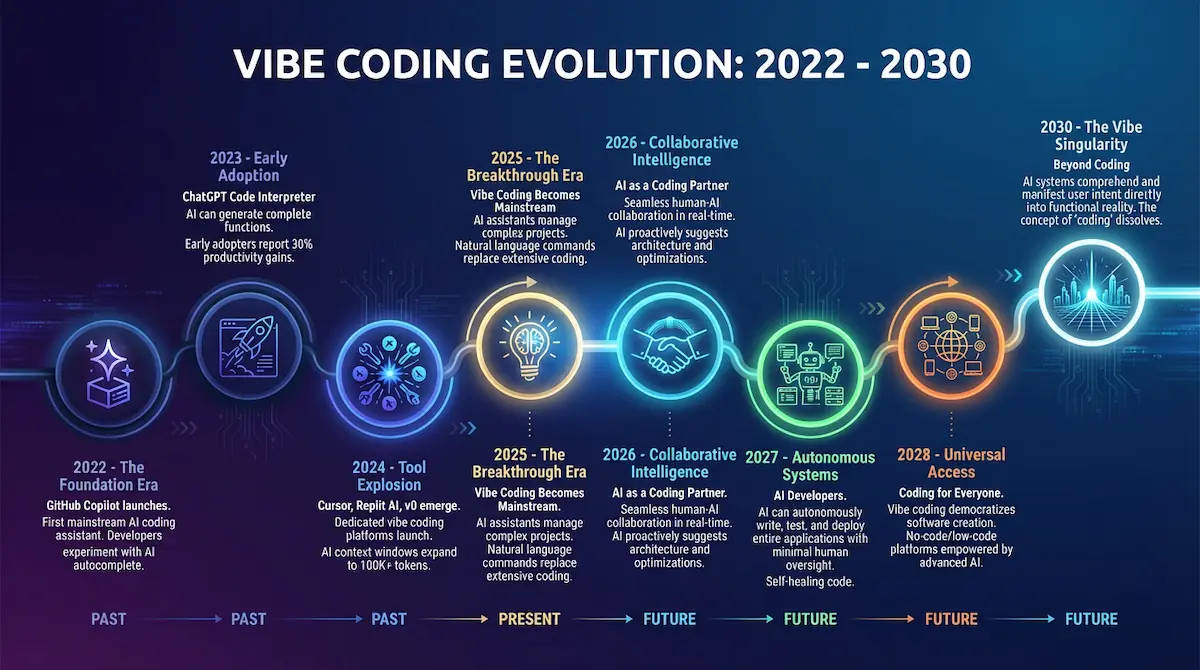
What caught fire wasn’t the underlying technology—developers had been using GitHub Copilot and ChatGPT for code assistance since 2022. What resonated was Karpathy’s framing: you could build software by “vibing” with AI, expressing your intent naturally rather than translating it into rigid programming syntax.
Within 48 hours, #vibecoding was trending across developer Twitter. Within two weeks, multiple startups had pivoted their AI coding tools to emphasize natural language workflows.
By March 2025, Y Combinator reported that 40% of their newest batch was using some form of vibe coding methodology. The movement had reached critical mass.
Vibe Coding Explained: Natural Language Meets Code Generation
So what exactly is vibe coding? At its core, vibe coding is a development methodology where you describe your software requirements in natural language, and an AI coding assistant translates those descriptions into executable code.
You’re not writing a function calculateUserScore(userData) { return userData.points * 1.5; }. Instead, you’re saying, “Create a function that takes user data and returns their score by multiplying their points by 1.5.”
The AI handles syntax, boilerplate, and implementation details. You handle creative direction, business logic, and overall architecture.
This represents a fundamental shift in the developer’s role. Traditional programming requires you to be a translator, architect, and typist simultaneously—you must know what you want to build, how to structure it, and the exact syntax to implement it.
Vibe coding splits these responsibilities. You focus on the “what” and “why.” The AI focuses on the “how.”
Under the hood, vibe coding leverages Large Language Models (LLMs) trained on billions of lines of code from GitHub, Stack Overflow, and open-source repositories. When you describe a feature in natural language, the AI performs several steps in milliseconds.
First, it analyzes your prompt to understand the intent and context. Second, it searches its training data for similar patterns and implementations.
Third, it generates code that matches your requirements, adapting patterns it’s learned to your specific use case. Fourth, it presents the code to you for review, testing, and refinement.
This process repeats iteratively. You test the generated code, identify issues or improvements, describe those changes in natural language, and the AI refines its output.
It’s a conversation, not a command. That’s why “vibe coding” as a term stuck—it captures the collaborative, almost improvisational nature of the process.
Why Vibe Coding Matters in 2026
The impact of vibe coding extends far beyond individual productivity gains. We’re seeing three fundamental shifts in how software gets built.
Speed has been redefined. What used to take experienced developers three weeks to prototype can now be done in an afternoon. Early-stage startups are shipping MVPs in days rather than months, dramatically reducing the time and capital required to validate ideas.
The talent bottleneck is dissolving. For decades, the limiting factor in tech wasn’t ideas—it was access to people who could code those ideas into reality. Vibe coding doesn’t eliminate the need for developer expertise, but it does lower the barrier for non-technical founders, designers, and product managers to build functional prototypes themselves.
Experienced developers are getting superhuman. Senior engineers using Vibe coding tools report 3-5x productivity increases for specific tasks such as building CRUD applications, creating API integrations, or implementing UI components. They’re not replacing their coding skills—they’re amplifying them with AI assistance.
The numbers support this momentum. According to GitHub’s 2025 State of the Octoverse report, 78% of developers now use some form of AI coding assistance, up from just 15% in 2023.
Replit reported in December 2025 that over 2 million applications had been built on its Vibe coding platform. The movement isn’t fringe—it’s mainstream.
Vibe Coding vs Traditional Programming: The Honest Comparison
Understanding when to use vibe coding versus traditional programming is critical for success. They’re not mutually exclusive—most professional developers use both approaches depending on the task.
Here’s how they compare across key dimensions:
| Speed | Extremely fast for standard patterns (CRUD, UI, integrations) | Slower initial development, faster for performance-critical code |
| Control | High-level direction; AI handles implementation details | Line-by-line precision; you control every character |
| Best For | MVPs, prototypes, CRUD apps, admin dashboards, landing pages | Complex algorithms, performance-critical systems, novel solutions |
| Learning Curve | Steep in prompt engineering; moderate in programming concepts | Steep in syntax, data structures, algorithms |
| Debugging | Context-dependent; requires understanding AI output | Systematic; follows logical error traces |
| Scalability | Excellent for standard architectures; challenging for custom optimization | Excellent for any architecture with proper planning |
| Code Quality | Varies widely; requires review and refinement | Consistent with developer skill level |
| Cost | Tool subscriptions ($10-50/month); lower labor cost | Developer salaries; higher labor cost |
The key insight: vibe coding excels at building 80% of most applications—the standard stuff every app needs, like authentication, databases, basic UI, and common workflows. Traditional programming still dominates for the remaining 20%—the custom algorithms, performance optimizations, and novel solutions that define your competitive advantage.
Competent developers use both. They vibe code the scaffolding and boilerplate, then hand-code the critical business logic and performance-sensitive components.
They let AI handle the tedious work while they focus their expertise where it matters most. That’s the real power of vibe coding—not replacement, but augmentation.
THE VIBE CODING MINDSET
Shifting From “How” to “What”
The hardest part of learning vibe coding isn’t technical—it’s mental. You need to rewire how you think about building software.
Traditional programmers are trained to think in implementation details. When they want user authentication, their brain immediately jumps to: “I’ll need bcrypt for password hashing, JWT tokens for session management, middleware to protect routes, and a users table with email and hashed_password columns.”
Vibe coders think differently. They ask: “What do I need? Secure user login with email and password, password reset via email, and protected pages that redirect to login if you’re not authenticated.”
The AI handles the how. You focus on the what and the why.
This shift feels uncomfortable at first, especially for experienced developers. You’re accustomed to maintaining control over every implementation decision, and suddenly you’re delegating that control to an AI.
But here’s the liberating truth: you’re not actually giving up control. You’re operating at a higher level of abstraction, the same way you don’t manually allocate memory when you write JavaScript or worry about TCP packet routing when you make an API call.
The mental model isn’t “AI writes code for me.” It’s “AI is my swift junior developer who needs clear direction and careful review.”
The Art of Prompt Engineering for Code Generation
Writing effective prompts is the core skill of vibe coding. The difference between mediocre AI-generated code and production-ready code often comes down to how well you communicate your requirements.
Let’s look at what separates bad prompts from exceptional ones.
Be Specific About Requirements
Vague prompts produce vague results. When you tell an AI “create a login page,” it has to guess at dozens of implementation details.
Here’s a weak prompt: “Create a login page.”
Here’s a strong prompt: “Create a responsive login page with email and password input fields, a blue ‘Sign In’ button, a ‘Forgot Password?’ link below it, and a ‘Don’t have an account? Sign up link at the bottom. Show red borders around input fields when validation fails. Use Tailwind CSS for styling.”
The second prompt eliminates ambiguity. The AI knows exactly what UI elements you want, how they should behave, and what styling framework to use.
Provide Context About Your Tech Stack
AI coding assistants can work with virtually any technology stack, but they need to know which one you’re using. Always specify your framework, libraries, and architectural decisions upfront.
Bad prompt: “Add a database to store user information.”
Good prompt: “Using Supabase as the database, create a ‘users’ table with columns: id (UUID primary key), email (unique), created_at (timestamp). Set up Row Level Security policies so users can only read their own data.”
The specificity ensures the AI generates code that integrates seamlessly with your existing setup. You avoid getting generic SQL when you need Supabase-specific syntax, or PostgreSQL functions when you’re using MongoDB.
Break Complex Features Into Steps
The single biggest mistake new vibe coders make is asking for too much at once. They prompt: “Build me a task management app with users, teams, tasks, comments, file uploads, and real-time collaboration.”
The AI becomes overwhelmed with context and produces shallow implementations of each feature. Instead, break your project into sequential steps.
Step 1: “Create the basic React app structure with routing for three pages: login, signup, and dashboard. Use React Router v6 and Tailwind CSS.”
Step 2: “Add Supabase authentication with email/password signup, login, and protected routes.”
Step 3: “Create a tasks table in Supabase with columns: id, user_id, title, description, completed, and created_at. Add CRUD operations.”
This iterative approach produces higher-quality code because the AI focuses on one feature at a time. You can test each step before moving forward, catching issues early rather than debugging a massive codebase.
Use Examples and References
AI models are trained on millions of existing applications, which means they understand references to popular tools and design patterns. Leverage this by providing examples.
Instead of describing a complex UI in words, reference something the AI has definitely seen: “Create a pricing table component similar to Stripe’s pricing page—three tiers displayed as cards, each with features listed as checkboxes, and a call-to-action button at the bottom.”
The AI instantly understands the layout, styling conventions, and user experience patterns you’re aiming for. You get professional-grade UI without writing a 500-word design specification.
This technique works for functionality too: “Implement a rich text editor similar to Notion’s block-based editor” or “Add search functionality like Algolia’s instant search with autocomplete suggestions.”
Iterate with Specific Feedback
Your first AI-generated code will rarely be perfect. The key is providing specific, actionable feedback rather than vague criticism.
Weak feedback: “This doesn’t look good.”
Strong feedback: “The spacing between elements is too tight. Increase padding to 24px on the container, add 16px margin between each card, and make the font size for headings 24px instead of 18px.”
Weak feedback: “The authentication isn’t working.”
Strong feedback: “When I try to log in with correct credentials, I get a 401 error. The console shows ‘Invalid API key’. Check that the Supabase API key is correctly loaded from environment variables and that it’s the anon public key, not the service role key.”
Specific feedback allows the AI to make targeted improvements. Vague feedback forces it to guess, often making changes that don’t address your actual problem.
Understanding AI Limitations: What Vibe Coding Can’t (Yet) Do
Setting realistic expectations prevents frustration and helps you know when to switch from vibe coding to traditional programming. AI coding assistants have fundamental limitations you need to understand.
Context window constraints mean the AI can only “see” a limited amount of your codebase at once—typically 100,000 to 200,000 tokens, equivalent to a few thousand lines of code. For small projects, this isn’t an issue, but for large applications with dozens of files, the AI may lose track of your overall architecture and make suggestions that conflict with code it can’t currently see.
Novel algorithm development remains challenging for AI. If you’re implementing a custom machine learning model, optimizing a unique data compression algorithm, or solving a problem that requires mathematical creativity, vibe coding struggles because the AI hasn’t seen similar patterns in its training data.
Highly optimized performance code typically requires manual intervention. AI can write code that works, but getting it to handle 10,000 requests per second with minimal latency involves the kind of profiling, benchmarking, and micro-optimization that comes from deep expertise.
Complex state management in large applications can trip up AI assistants. Managing state across dozens of components, handling complex async operations, and preventing race conditions requires architectural thinking that goes beyond pattern matching.
Domain-specific expertise in regulated industries poses challenges. Building financial trading algorithms that comply with SEC regulations or medical diagnostic tools that meet HIPAA requirements requires specialized knowledge that general-purpose AI models don’t possess.
The good news: you can mitigate many of these limitations. Start with vibe coding to build your application’s foundation, then bring in specialized expertise or hand-code the critical 10-20% that requires human judgment.
Vibe coding accelerates the journey, but it doesn’t replace the destination.
ESSENTIAL VIBE CODING TOOLS DEEP DIVE
The 7 Best Vibe Coding Tools in 2026: Complete Comparison
The vibe coding tool landscape exploded in 2025, creating both opportunity and confusion. Choosing the right platform for your project can mean the difference between shipping in days versus struggling for weeks, so let’s cut through the marketing hype and compare what actually matters.
Each tool occupies a distinct niche in the vibe coding ecosystem. Understanding these differences helps you pick the right tool—or combination of tools—for your specific needs.
Tool #1: Cursor – Best for Professional Developers
Cursor is a fork of Visual Studio Code with deep AI integration baked into every feature. It looks and feels like the IDE you already know, but with an AI coding assistant that understands your entire codebase, not just the current file.
What makes Cursor special is its codebase-aware intelligence. When you ask it to “add error handling to all API calls,” it scans your project, identifies every API call across dozens of files, and applies consistent error handling patterns everywhere.
Traditional code editors require you to hunt through files manually. Cursor does the hunting for you.
Strengths include multi-file editing (change 10 files simultaneously with a single prompt), inline suggestions that understand your coding style, and a command-K interface that feels like having a senior developer on call. The AI can explain unfamiliar code, suggest refactors, and even generate comprehensive tests.
Ideal users are experienced developers who want AI augmentation without giving up their IDE workflow. If you’re comfortable with Git, terminal commands, and debugging tools, Cursor enhances your existing skills rather than replacing them.
Pricing starts free for basic features, with the Pro plan at $20/month unlocking unlimited AI requests and premium models. For professional development work, the Pro tier pays for itself in saved time within the first week.
Best use cases include full-stack web applications, refactoring legacy codebases, adding features to existing projects, and any scenario where you need precise control over implementation details. The cursor shines when you’re working on complex applications with an established architecture.
Tool #2: Windsurf – Best for Fast AI Pair Programming
Windsurf positions itself as the fastest vibe coding experience available, emphasizing real-time code transformation over traditional file-by-file editing. The interface feels like pair programming with an extremely fast colleague who types 1,000 words per minute.
What sets Windsurf apart is its “flows” system—predefined workflows that handle everyday development tasks end to end. Instead of prompting for each step individually, you describe the complete feature, and Windsurf orchestrates the entire implementation automatically.
Strengths focus on velocity and momentum. Windsurf excels at turning rough ideas into working prototypes faster than any competitor, making it perfect for the early validation phase when you’re testing whether an idea has legs.
The AI suggests next steps proactively, anticipating what you’ll need before you ask. This forward-thinking approach keeps you in flow state rather than constantly context-switching between planning and implementation.
Ideal users include startup founders racing to validate ideas, developers building MVPs under tight deadlines, and teams running design sprints where speed matters more than perfection. If “done is better than perfect” describes your philosophy, Windsurf matches your energy.
Pricing begins at $15/month for individual developers, with team plans offering collaboration features and shared context. The company provides educational discounts and a generous free tier for students and open-source projects.
Best use cases include rapid prototyping, hackathon projects, proofs of concept for client pitches, and experimental features you want to test before committing serious development resources. Windsurf gets you from zero to “here’s a working demo” faster than anything else.
Tool #3: Lovable – Best for Non-Coders
Lovable isn’t technically a vibe coding tool in the traditional sense—it’s a no-code platform with AI generation built in. But for entrepreneurs and designers with zero programming background, it’s the most accessible entry point into building real applications.
What makes Lovable unique is its visual-first approach combined with natural language generation. You describe your app in plain English, and Lovable generates a visual interface you can click through and modify, then exports to production-ready code.
Strengths center on removing intimidation factors that stop non-technical people from trying vibe coding. There’s no terminal, no Git, no cryptic error messages—just a friendly interface that feels more like designing in Figma than coding.
The platform handles hosting, databases, and deployment automatically. You focus entirely on what your app does and how it looks, while Lovable manages all the infrastructure complexity behind the scenes.
Ideal users are solopreneurs validating business ideas, designers who want their prototypes to be functional rather than static, product managers creating interactive demos, and anyone who’s ever said, “I wish I could code.” If opening Visual Studio Code feels overwhelming, start here.
Pricing is $49/month for published applications with custom domains and production features. The free tier allows unlimited development and testing, so you only pay when you’re ready to launch to real users.
Best use cases include landing pages with payment integration, directory websites, simple SaaS applications, membership sites, and CRUD applications like CRMs or inventory management tools. Lovable handles 80% of typical business application needs without requiring any coding knowledge.
Tool #4: Replit – Best for Full-Stack Collaboration
Replit pioneered browser-based development years before vibe coding existed, and they’ve seamlessly integrated AI agents into an already mature platform. The result is a collaborative workspace where teams can code together in real-time.
What distinguishes Replit is the complete development environment living in your browser—no installation, no configuration, no “works on my machine” problems. You click a button and immediately have a full-stack development environment with a database, hosting, and an AI assistant ready to go.
Strengths emphasize collaboration and sharing. Multiple developers can edit the same project simultaneously, seeing each other’s changes in real-time, like Google Docs for code.
The AI agent understands not just your code but your team’s coding patterns and conventions. When a teammate asks the AI to “follow the API structure we established yesterday,” it knows precisely what that means because it observed yesterday’s session.
Ideal users span distributed development teams, coding bootcamps, and educators, open-source contributors who want low-friction onboarding, and anyone building applications that require both frontend and backend coordination. If your project involves multiple people or you’re teaching others to code, Replit’s collaborative features are unmatched.
Pricing offers a generous free tier with public projects, then $25/month for the Hacker plan with private repositories and more computational resources. Team plans at $33/month per user add collaboration management and shared team knowledge.
Best use cases involve building APIs and full-stack applications, teaching and learning environments, team hackathons, open-source projects welcoming new contributors, and any scenario where you want someone else to run your code instantly without setup friction. The instant “fork and run” capability makes Replit perfect for shareable, collaborative development.
Tool #5: Bolt.new – Best for Instant Prototyping
Bolt.new takes a radical approach: one prompt, one working application, zero setup. Built on StackBlitz’s WebContainer technology, it runs entire development environments directly in your browser with shocking speed.
What makes Bolt revolutionary is the elimination of setup time entirely. No account creation required, no configuration needed—you type a prompt, and 30 seconds later you have a working application with a live preview, editable code, and instant deployment.
Strengths focus solely on speed-to-prototype. While other tools optimize for production-readiness or team collaboration, Bolt optimizes for the moment when someone says, “could we build something that…” and you respond, “let me show you,” and have a working demo running before they finish their coffee.
The entire stack runs client-side, meaning instant hot reloading and zero latency between code changes and preview updates. You modify a component, and the preview updates before you can Alt-Tab to check it.
Ideal users are designers validating interaction patterns, product managers creating clickable demos for stakeholder meetings, developers exploring new libraries or frameworks, and anyone who needs an “show, don’t tell” prototype. If you’re in a meeting and someone asks, “Could we try…”, Bolt lets you try it right there.
Pricing is free, but there are limitations on AI requests and project persistence. Premium tiers add unlimited AI usage and permanent project hosting, but the free tier is genuinely helpful for quick experiments.
Best use cases include client pitch demos, proofs of concept to test feasibility, exploring new JavaScript frameworks, creating interactive examples for documentation or tutorials, and rapid A/B testing of UI variations. Bolt excels when “show me” matters more than “ship it to production.”
Tool #6: v0 by Vercel – Best for UI-First Development
v0 takes a different approach than most vibe coding tools—it generates beautiful UI components first, then you integrate them into your application. Think of it as an AI design system that speaks React and Tailwind.
What makes v0 special is its focus on design quality. Rather than generating functional but ugly components like many AI tools, v0 produces components that look professionally designed out of the box, with thoughtful spacing, typography, and visual hierarchy.
Strengths center on frontend excellence. When you prompt “create a pricing table,” v0 doesn’t just give you a table with numbers—it gives you a marketing-ready component with hover effects, responsive breakpoints, and visual polish that typically requires a designer’s input.
The workflow integrates seamlessly with modern React development. Generate components in v0, copy the code, paste it into your Next.js or React project, and everything works because v0 generates clean, standard React code with Tailwind classes.
Ideal users are frontend developers who want to accelerate UI development without sacrificing quality, full-stack developers whose design skills lag behind their backend expertise, and agencies building client websites where visual polish differentiates their work. If you can code the logic but struggle with making it look professional, v0 is your answer.
Pricing uses a credit-based system where each generation consumes credits. The free tier provides enough credits for experimentation, while paid plans start at $20/month for professional usage.
Best use cases include marketing websites, SaaS application interfaces, dashboard UIs, component libraries for design systems, and any project where visual quality impacts business outcomes. v0 shines when aesthetics matter as much as functionality.
Tool #7: GitHub Copilot – Best for Traditional Enhancement
GitHub Copilot isn’t a pure vibe coding tool—it’s more like intelligent autocomplete on steroids. But for traditional developers who want to dip their toes into AI-assisted coding without changing their entire workflow, Copilot offers the gentlest entry point.
What sets Copilot apart is its seamless integration with your existing IDE and workflow. It works in VS Code, JetBrains IDEs, Neovim, and even Visual Studio, showing inline suggestions as you type rather than requiring you to learn a new interface.
Strengths lie in context-aware code completion and natural language comments that generate implementations. Write a comment like // function to validate email addresses using regex, and Copilot suggests the complete function implementation.
The latest Copilot Chat feature brings conversational AI directly into your editor sidebar. You can ask questions about your code, request refactors, or generate tests without leaving your development environment.
Ideal users are experienced developers who want AI assistance without abandoning their carefully configured development setup, teams with established coding standards and linting rules, and anyone working on languages or frameworks where specialized vibe coding tools have limited support. If you love your current IDE, Copilot enhances it rather than replacing it.
Pricing is $10/month for individuals or $19/month for Copilot Pro with additional features and faster response times. Enterprise plans offer centralized billing and policy controls.
Best use cases include enhancing existing development workflows, working with less common programming languages (Rust, Go, Elixir), contributing to large open-source projects with established conventions, and situations where you need AI assistance but can’t adopt a completely new development environment. Copilot augments what you’re already doing rather than requiring wholesale change.
Comparison Matrix: Choosing Your Vibe Coding Tool
Here’s how these seven tools stack up across the dimensions that matter most:
| Cursor | Professional developers | Medium | Very High | $20/mo | Medium |
| Windsurf | Fast prototyping | Medium | Medium | $15/mo | Low-Medium |
| Lovable | Non-coders | Very Easy | Low | $49/mo | Very Low |
| Replit | Team collaboration | Easy | Medium | $25/mo | Low |
| Bolt.new | Instant demos | Very Easy | Low | Free* | Very Low |
| v0 | Beautiful UI | Easy | Medium | $20/mo | Low |
| Copilot | IDE enhancement | Very Easy | Very High | $10/mo | Very Low |
*Bolt.new has premium tiers but core functionality is free
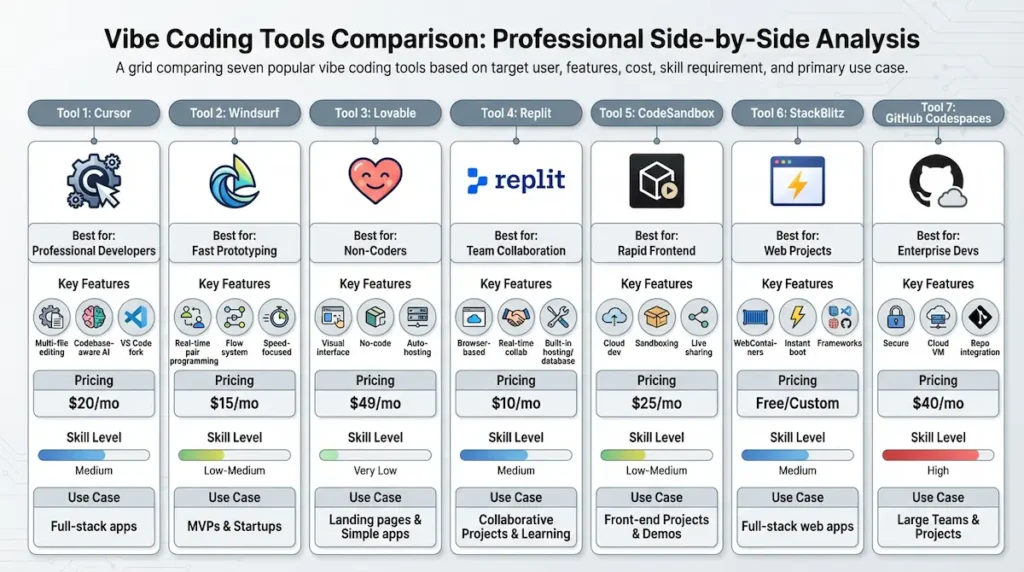
The bottom line: Most professional vibe coders use multiple tools strategically. They might start in Bolt or Lovable for rapid prototyping, move to v0 for UI polish, then migrate to Cursor or Windsurf for production development.
There’s no single “best” vibe coding tool—only the best tool for your current project phase and skill level.
YOUR FIRST VIBE CODING PROJECT
Step-by-Step Tutorial: Build Your First Vibe-Coded App in 30 Minutes
Theory only takes you so far—the real learning happens when you build something. In this tutorial, we’ll create a complete task management application with user authentication, database persistence, and responsive design using vibe coding.
By the end of this section, you’ll have a fully functional app running live on the internet. More importantly, you’ll understand the vibe coding workflow well enough to build your own projects independently.
What we’re building: A task management app called “TaskFlow” where users can sign up, log in, create tasks, mark them complete, filter by status, and delete tasks they no longer need. It’s simple enough to build in 30 minutes but complex enough to demonstrate real-world vibe coding techniques.
What you’ll learn: How to start with a Product Requirements Document, craft effective opening prompts, iterate feature-by-feature, debug AI-generated code, and deploy to production. These skills transfer to any future vibe coding project you build.
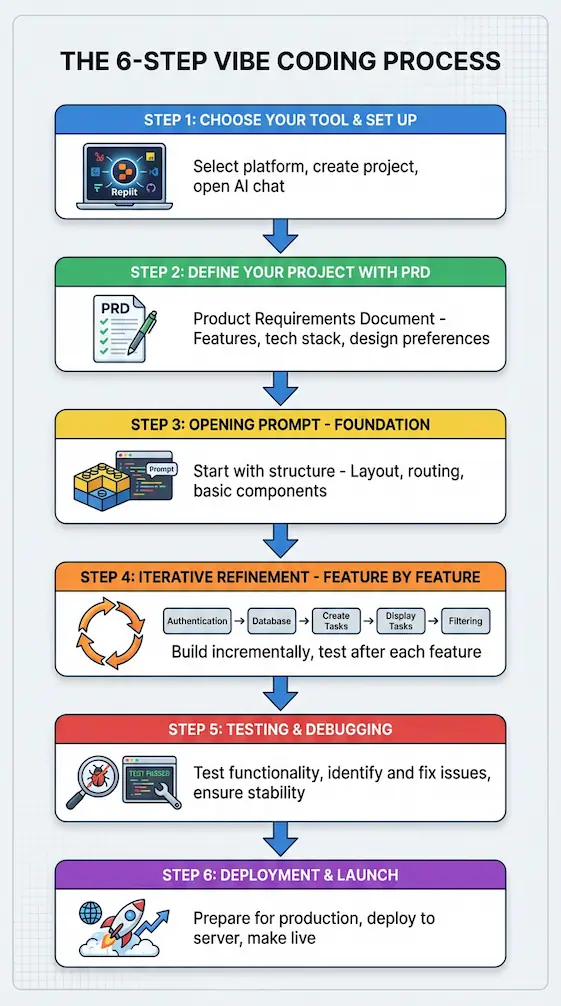
Step 1: Choose Your Tool and Set Up
For this tutorial, we’ll use Replit because it requires zero local installation and handles hosting automatically. If you prefer Cursor or Windsurf, the prompts will work there too with minor adjustments.
Head to replit.com and create a free account if you don’t have one. Click the “+ Create Repl” button and select “Next.js” as your template—this gives us a modern React framework with built-in server-side capabilities.
Name your project “TaskFlow” and click “Create Repl.” Within seconds, you’ll have a fully configured development environment running in your browser with a code editor on the left and a live preview on the right.
Open the AI chat panel by clicking the robot icon in the left sidebar. This is where you’ll have your conversation with the Vibe Coding Assistant throughout the build process.
Step 2: Define Your Project with a PRD (Product Requirements Document)
Before writing a single prompt, invest five minutes in planning what you’re building. A clear PRD prevents scope creep and gives the AI explicit direction, rather than forcing it to guess your intentions.
Here’s the PRD for our TaskFlow app—copy this into a text file or keep it visible in a second browser tab:
PROJECT: TaskFlow - Task Management Application

CORE FEATURES:
- User authentication (email/password signup and login)
- Create new tasks with title and optional description
- View all tasks in a clean list
- Mark tasks as complete/incomplete with checkbox
- Delete tasks
- Filter tasks by status (All, Active, Completed)
- Persistent storage (tasks saved to database)

TECHNICAL REQUIREMENTS:
- Framework: Next.js 14 with App Router
- Styling: Tailwind CSS
- Database: Supabase (PostgreSQL)
- Authentication: Supabase Auth
- Responsive: Mobile-first design

DESIGN PREFERENCES:
- Modern, clean interface
- Primary color: Blue (#3B82F6)
- Dark theme with white text
- Generous spacing for readability
- Similar aesthetic to Todoist or Linear

USER STORIES:
- As a new user, I can sign up with email/password
- As a returning user, I can log in securely
- As a logged-in user, I can create tasks quickly
- As a logged-in user, I can see all my tasks at a glance
- As a logged-in user, I can mark tasks complete
- As a logged-in user, I can filter to see only active or completed tasks
- As a logged-in user, I can delete tasks I no longer need
This PRD is your north star. Every prompt you write should move you toward fulfilling these requirements, and whenever you’re unsure what to build next, refer back to this document.
Step 3: The Opening Prompt—Start With the Foundation
Never ask AI to build your entire application in one prompt. Instead, start with the foundational structure and add features incrementally—this produces higher quality code and makes debugging infinitely easier.
Copy this opening prompt into your Replit AI chat:
Create a Next.js 14 task management app using the App Router and Tailwind CSS.

Set up the basic project structure with:
- A clean, modern layout with a header showing "TaskFlow" logo/title
- A main content area with a sidebar (for filters) and task display area
- Responsive design that collapses the sidebar on mobile screens
- Color scheme: primary blue (#3B82F6), dark background (#1F2937), white text (#FFFFFF)
- Include placeholder components for TaskList, TaskForm, and FilterBar
- Set up basic routing for home page

Use semantic HTML and follow Next.js 14 best practices. Make it look polished even without real functionality yet.
Click send and watch the magic happen. Within 20-30 seconds, the AI will generate multiple files: updated app/page.tsx, new components, and modified globals.css with your color scheme.
Check the live preview on the right side of your screen. You should see a beautiful dark-themed layout with your header, sidebar, and main content areas properly structured and responsive.
What just happened: The AI understood your tech stack requirements, design preferences, and structural needs. It generated production-quality boilerplate that would take an experienced developer 20-30 minutes to write manually, and you got it in 30 seconds by describing what you wanted in plain English.
Step 4: Iterative Refinement—Build Feature by Feature
Now we’ll add functionality one feature at a time, testing after each addition. This iterative approach is the core of successful vibe coding—build, test, refine, repeat.
Adding Authentication (Prompt 1):
Integrate Supabase authentication into this Next.js app.

Requirements:
- Create a signup page at /signup with email and password fields
- Create a login page at /login with email and password fields
- Add password validation (minimum 8 characters)
- Show error messages if signup/login fails
- Redirect to home page after successful login
- Protect the home page - redirect to /login if user is not authenticated
- Add a "Logout" button in the header that appears when user is logged in
- Store Supabase credentials in environment variables (.env.local)

Provide instructions for setting up Supabase project and getting the API keys.
The AI will generate authentication pages, implement protected routes, and give you step-by-step instructions for creating your Supabase project. Follow those instructions: go to supabase.com, create a free account, start a new project, and copy your API keys into the .env.local file the AI created.
Test the authentication flow by clicking “Sign Up” in your app preview. Create a test account, verify you’re redirected to the home page, and confirm the logout button appears.
Adding Database Schema (Prompt 2):
Set up the Supabase database schema for tasks.

Create a "tasks" table with these columns:
- id: UUID (primary key, auto-generated)
- user_id: UUID (foreign key to auth.users)
- title: TEXT (required)
- description: TEXT (optional)
- completed: BOOLEAN (default false)
- created_at: TIMESTAMP (auto-generated)

Set up Row Level Security (RLS) policies so:
- Users can only see their own tasks
- Users can only insert their own tasks
- Users can only update their own tasks
- Users can only delete their own tasks

Provide the SQL commands I need to run in Supabase SQL editor.
The AI generates the exact SQL commands you need. Copy them, go to your Supabase dashboard, navigate to the SQL Editor, paste the commands, and run them.
Your database is now set up with proper security. Return to Replit and confirm the AI has updated your app code to connect to this database structure.
Adding Task Creation (Prompt 3):
Implement the TaskForm component to create new tasks.

Requirements:
- Input field for task title (required, shows error if empty)
- Textarea for optional description
- "Add Task" button (blue background, white text)
- Form submission should:
  1. Validate that title is not empty
  2. Insert new task into Supabase "tasks" table
  3. Associate task with logged-in user's ID
  4. Clear the form after successful submission
  5. Show success message briefly
  6. Immediately display the new task in the list

Handle errors gracefully with user-friendly messages. Style consistently with our dark theme.
After the AI generates this code, test it thoroughly. Try creating a task with just a title, then one with both title and description, then try submitting an empty form to confirm validation works.
Each task should appear in your task list immediately. If you refresh the page, the tasks should persist because they’re stored in your Supabase database, not just local state.
Adding Task Display and Actions (Prompt 4):
Implement the TaskList component to display and manage tasks.

Features needed:
- Fetch all tasks for the logged-in user from Supabase
- Display each task as a card showing title, description, and created date
- Each task card should include:
  1. Checkbox to toggle completed status (updates database immediately)
  2. Visual change when task is marked complete (strikethrough title, opacity 60%)
  3. Delete button (red, shows confirmation dialog)
  4. Hover effects for better UX
- Show "No tasks yet" message with helpful text when list is empty
- Real-time updates when tasks are created, completed, or deleted
- Loading state while fetching tasks

Style task cards with subtle borders, good spacing, and responsive design (stack on mobile, grid on desktop if multiple columns).
Test every interaction: mark tasks complete and incomplete, delete tasks (including canceling the confirmation dialog), and create multiple tasks to see the layout adapt. The real-time updates should work without requiring page refreshes.
Adding Filtering (Prompt 5):
Implement the FilterBar component with three filter options.

Requirements:
- Three buttons: "All", "Active", "Completed"
- Clicking a filter button updates the task list to show:
  - All: Shows all tasks
  - Active: Shows only tasks where completed = false
  - Completed: Shows only tasks where completed = true
- Active filter button has distinct visual style (brighter blue background)
- Filter state persists during the session (using URL params or local state)
- Show task count for each category (e.g., "Active (3)")

Place FilterBar in the sidebar. Style buttons consistently with our design system.
Test all three filters and verify the counts update correctly as you complete or create tasks. The filtering should feel instant without loading delays.
Step 5: Testing and Debugging AI-Generated Code
Now that your app has all core features, it’s time for comprehensive testing. AI-generated code works most of the time, but edge cases can reveal bugs that weren’t obvious during development.
Create a testing checklist:
- Can new users sign up successfully?
- Do login errors show helpful messages?
- Are tasks associated with the correct user? (Create a second test account to verify.)
- Does the task completion toggle work in both directions?
- Does deleting a task permanently remove it from the database?
- Do filters show correct task counts?
- Does the app work on mobile screen sizes?
- What happens with very long task titles or descriptions?
- Can users with zero tasks navigate the app smoothly?
Go through each item systematically. When you find issues, don’t panic—debugging is part of vibe coding just like traditional development.
Example debugging prompt for a common issue:
When I delete a task, it disappears from the UI but I get this error in the console: [paste the exact error message]
The task does get deleted from the database when I refresh. Fix the real-time UI update after deletion so there are no errors and the task disappears smoothly.
Be specific about what’s broken, include error messages, and describe what you expected versus what actually happened. The AI needs these details to generate an accurate fix.
Step 6: Deployment—Ship Your App to Production
Replit makes deployment ridiculously simple—your app is already running live on Replit.dev subdomain. But let’s make it production-ready with a few final touches.
Final polish prompt:
Prepare this app for production deployment:

1. Add a proper page title and meta description for SEO
2. Add a favicon
3. Implement proper error boundaries to catch React errors gracefully
4. Add loading skeletons for better perceived performance
5. Ensure all environment variables are properly configured
6. Add a simple footer with copyright and "Built with Vibe Coding" link

Provide a production deployment checklist.
The AI will make these improvements and give you a checklist like this:
Production Deployment Checklist:
- Environment variables set in Replit (not just .env.local)
- Supabase project is in production mode (not paused)
- Test all features one final time in the live environment.
- Share the Replit URL or configure a custom domain.
- Set up error monitoring (optional but recommended)
- Create at least one database backup.
Walk through each item. Replit keeps your app running 24/7 on their free tier with some limitations, or you can upgrade to the Hacker plan for always-on hosting.
Your app is now live. Share the URL with friends, add it to your portfolio, or use it as the foundation for a more complex project. You just built and deployed a full-stack application in 30 minutes using nothing but natural language prompts.
What you accomplished: User authentication, database integration, CRUD operations, filtering logic, responsive design, and production deployment—all without writing code manually. This is the power of vibe coding, and these same techniques scale to much larger applications.
Ready to put your app online?
You have built it. Now it needs a home on the internet that does not sleep when your laptop does.
Hostinger gives you a one-click environment to deploy and host your vibe-coded app, with a 30-day money-back guarantee while you test it.
Host your app on Hostinger →Affiliate link. We may earn a commission if you sign up, at no extra cost to you.
ADVANCED VIBE CODING TECHNIQUES
Level Up: Advanced Vibe Coding Strategies for Production Apps
Once you’ve built your first few vibe-coded projects, you’ll start hitting the limits of basic prompting. This section covers advanced techniques that separate hobbyists from professionals shipping production applications.
These strategies help you maintain code quality as projects grow, collaborate effectively with teams, and build applications that scale beyond simple prototypes. Master these techniques, and you’ll be operating at the same level as experienced vibe coders building real businesses.
Multi-File Project Management
Small projects with 5-10 files are manageable with basic prompting, but real applications often span dozens or hundreds of files. The AI’s context window—its ability to “see” your entire codebase—becomes the limiting factor.
The problem: When you ask the AI to “add error handling to all API calls,” it might only see the current file you’re editing and miss 15 other files with API calls. The result is inconsistent implementations across your codebase.
The solution: Use configuration files that establish project-wide rules for the AI to reference before generating code. These act as a persistent memory system that survives beyond individual chat sessions.
Create a .cursorrules file (for Cursor) or .ai/rules.md file (for other tools) in your project root with content like this:
Copy# Project Architecture Rules

## Code Style
- Use TypeScript for all new files
- Follow Airbnb JavaScript style guide
- Prefer functional components over class components
- Use async/await over .then() for promises

## File Organization
- Components go in /src/components
- API routes in /src/app/api
- Database queries in /src/lib/db
- Types in /src/types

## Naming Conventions
- Use PascalCase for components (UserProfile.tsx)
- Use camelCase for functions (fetchUserData)
- Use UPPER_SNAKE_CASE for constants (MAX_RETRY_ATTEMPTS)

## Testing Requirements
- Write tests for all business logic
- Test files go next to source files with .test.tsx extension
- Mock external API calls in tests

## Security Standards
- Never commit API keys or secrets
- Always validate user inputs
- Use parameterized queries for database operations
- Implement rate limiting on public endpoints
Reference this file in your prompts: “Following the rules in .cursorrules, add authentication to the dashboard page.” The AI will read your rules and generate code that matches your established patterns.
Advanced technique: Create template files for common patterns. When you need a new API endpoint, prompt: “Create a new API endpoint at /api/users following the pattern established in /api/tasks/route.ts” and the AI will replicate your structure exactly.
Tool Stacking Strategy: Combining Multiple Platforms
Professional vibe coders rarely use just one tool—they strategically combine platforms to leverage each tool’s unique strengths. This approach maximizes speed and quality while minimizing each tool’s weaknesses.
The workflow most professionals use: Start in a rapid prototyping tool to validate your idea, move to a visual tool for UI polish, then migrate to a power tool for production development. Each tool excels at its phase.
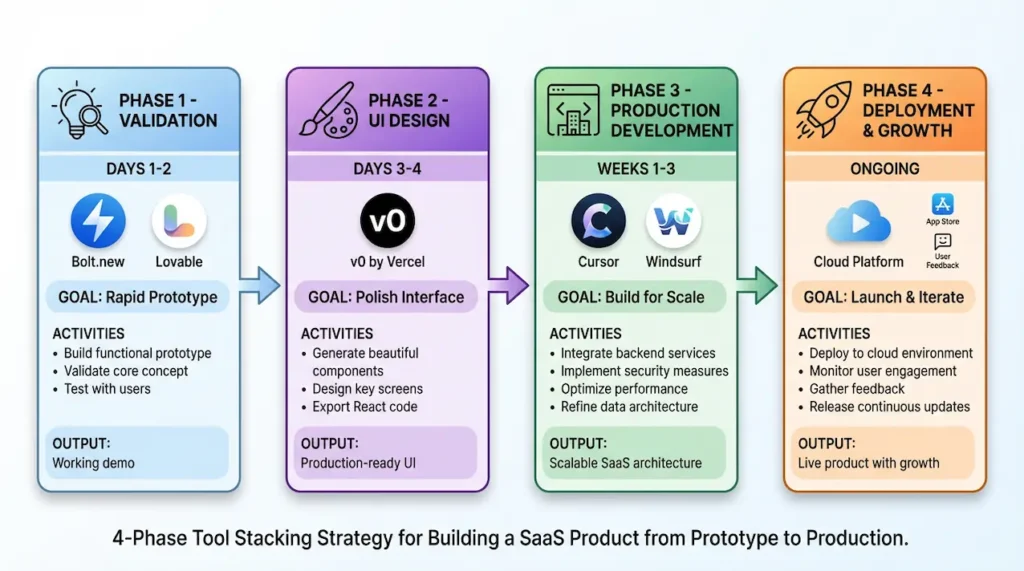
Example stack for a SaaS product:
Phase 1 – Validation (Days 1-2): Use Bolt.new or Lovable to build a functional prototype in hours. The goal isn’t production-ready code—it’s to validate that users want what you’re building and that the core features work conceptually.
Phase 2 – UI Design (Days 3-4): Once validated, use Vercel’s v0 to generate beautiful, polished components for your key interfaces. Export the React components and integrate them into a proper codebase with routing and state management.
Phase 3 – Production Development (Weeks 1-3): Migrate to Cursor or Windsurf for building production features. These tools give you the control and power to handle complex business logic, database optimization, and all the details that separate prototypes from products.
Phase 4 – Maintenance (Ongoing): Continue using Cursor with GitHub Copilot for ongoing feature additions and bug fixes. The combination provides both conversational AI for complex changes and autocomplete for quick edits.
When to switch tools mid-project: The best time to migrate is after validating your core concept but before accumulating too much code debt. If you’ve built 30+ components in a rapid tool and the codebase feels unwieldy, that’s your signal to migrate to a more powerful platform.
Migration doesn’t mean rewriting everything from scratch. Prompt your new tool: “I’m migrating this project from Lovable. Here’s my current code structure [paste key files]. Recreate this project in Next.js with improved architecture while maintaining all existing functionality.”
Version Control and Collaboration
Vibe-coded projects need version control just like traditionally coded projects—maybe even more so, because AI-generated changes can be extensive and complex to track mentally. Integrating Git into your Vibe coding workflow protects you from catastrophic mistakes.
Essential Git practices for vibe coding:
Commit after every successful feature addition, not at the end of the day. When the AI generates code for “add user profile editing,” test it, and if it works, immediately commit with the message: feat: add user profile editing.
If the following prompt breaks something, you can roll back to the last working state instantly. Without frequent commits, you’ll find yourself saying “it was working an hour ago” with no way to recover that state.
The problem with AI-generated commits: Most vibe coding tools can auto-commit changes, but their commit messages are generic, like “Update code,” which makes your Git history useless for debugging. Disable auto-commits and write descriptive messages yourself.
Collaboration workflow for teams: When multiple people work on the same project, you need conventions to prevent conflicts and maintain consistency. Here’s a proven team workflow:
Create a PROMPTS.MD file in your repository documenting the major prompts used to build each feature. This serves as both documentation and a prompt library teammates can reference: “How did we implement authentication? Let me check PROMPTS.md.”
Use feature branches religiously. Each teammate works on a separate branch: feature/payment-integration, feature/email-notifications. Vibe code your feature, test thoroughly, then merge to main only when complete.
Code review for AI-generated code: Just because AI wrote it doesn’t mean it should skip review. Assign a teammate to review before merging, focusing on security issues, performance problems, and consistency with your architecture.
The reviewer asks: “Does this code handle errors properly? Are there SQL injection risks? Does it follow our established patterns?” Catching issues before they reach production is cheaper than debugging customer-reported bugs.
Quality Assurance: Making Sure AI Code Is Production-Ready
AI-generated code often works for happy-path scenarios but fails under stress, edge cases, or malicious inputs. A production-ready application requires systematic quality assurance beyond “I tested it and it worked.”
Your production-ready checklist:
Security Audit:
- No hardcoded API keys, passwords, or secrets in code
- All user inputs are validated and sanitized.
- SQL queries use parameterized statements (no string concatenation)
- Authentication tokens are stored securely (httpOnly cookies, not localStorage)
- CORS policies allow only intended domains
- Rate limiting implemented on public endpoints
- Error messages don’t expose system internals.
Use security scanning tools on AI-generated code. Free options like npm audit for dependency scanning and OWASP ZAP for web application scanning automatically detect common vulnerabilities.
Performance Testing:
- Lighthouse score above 90 for performance
- Images optimized and lazy-loaded
- Database queries use indexes on the columns being searched.
- API responses under 200ms for typical requests
- Bundle size under 300KB for initial JavaScript load
- No memory leaks during extended use
Prompt for performance improvements: “Run Lighthouse on this application and fix all performance issues scoring below 90. Optimize images, implement lazy loading, and reduce JavaScript bundle size.”
Accessibility Check:
- All interactive elements are keyboard-navigable
- Color contrast meets WCAG AA standards (4.5:1 ratio minimum)
- Images have descriptive alt text.
- Form inputs have associated labels.
- Screen reader tested with NVDA or VoiceOver.
Many accessibility issues are easy to fix but require explicit prompting: “Add proper ARIA labels, improve color contrast for text on colored backgrounds, and ensure all buttons are keyboard accessible.”
Cross-Browser Testing:
- Works in Chrome, Firefox, Safari, and Edge
- Mobile browsers (iOS Safari, Chrome Mobile) tested
- No console errors in any browser
- Polyfills added for any modern JavaScript features.
Error Handling and Logging:
- Try-catch blocks around all async operations
- User-friendly error messages (not technical stack traces)
- Error logging service integrated (Sentry, LogRocket, etc.)
- Graceful degradation when APIs fail
Prompt: “Add comprehensive error handling with try-catch blocks around all database operations and API calls. Show user-friendly error messages and log technical details to the console in development mode.”
Automated Testing:
- Unit tests for business logic functions
- Integration tests for API endpoints
- End-to-end tests for critical user flows.
- Test coverage above 60% for core functionality
Generate tests with prompts: “Create Jest unit tests for the user authentication functions covering successful login, failed login, password validation, and token refresh. Include edge cases like network failures and invalid inputs.”
The AI generates comprehensive test suites quickly, giving you confidence that refactors won’t break existing functionality. Run tests before every deployment to catch regressions early.
The pragmatic approach: You don’t need 100% perfection on every item before launching. Focus on security (non-negotiable), then on performance, and then on everything else based on your application’s specific risks.
A blog platform can tolerate occasional slow loads more than a payment processing system can tolerate security vulnerabilities. Prioritize ruthlessly based on what failure would cost your users and your business.
COMMON PITFALLS AND HOW TO AVOID THEM
The Dark Side of Vibe Coding: 7 Mistakes That Will Cost You Time and Money
Vibe coding feels magical when it works, but when it goes wrong, it goes spectacularly wrong. The difference between successful vibe coders and frustrated ones often comes down to avoiding these seven critical mistakes.
These aren’t theoretical problems—they’re real issues that cost developers days of debugging, force complete rewrites, or worse, create security vulnerabilities that compromise user data. Learn from others’ expensive mistakes instead of making them yourself.
Mistake #1: Blindly Trusting AI-Generated Code
The single most dangerous assumption in vibe coding is that AI-generated code is correct because it runs without errors. Code can execute perfectly and still contain security holes, performance bottlenecks, or logic bugs that only surface under specific conditions.
Why this happens: AI assistants present code with confidence, using proper syntax and structure that looks professional. Our brains interpret this polish as correctness, leading us to skip the review process we’d usually apply to code from a junior developer.
Real consequences: A developer on Reddit shared how they deployed an AI-generated authentication system that worked flawlessly in testing. Two weeks after launch, a security researcher discovered that anyone could access any user’s data by simply changing a URL parameter—the AI had generated broken authorization logic that only checked authentication, not authorization.
The solution: Treat every line of AI-generated code with healthy skepticism. Read through the implementation, ask yourself “what could go wrong?”, and test edge cases aggressively.
Specifically, review AI code for these common issues: hardcoded credentials or API keys, missing input validation, unhandled error states, race conditions in async operations, and SQL injection vulnerabilities. These bugs rarely cause immediate crashes, so they slip through testing unless you specifically look for them.
Best practice: After the AI generates code, prompt it to critique its own work: “Review the code you just generated for security vulnerabilities, edge cases, and potential bugs. What could go wrong?” The AI often catches issues in review that it missed during generation.
Mistake #2: Vague Prompts Lead to Vague Results
New vibe coders write prompts like they’re talking to a mind-reading colleague who knows their project intimately. The AI isn’t psychic—it makes educated guesses based on limited information, and those guesses are often wrong.
Example of a vague prompt: “Make the button look better.” Better how? Bigger? Different color? Add an icon? Change the hover effect? The AI will pick something, but it probably won’t match what you envisioned.
Example of a specific prompt: “Increase the button padding to 16px vertical and 32px horizontal. Change the background color to #3B82F6 on hover with a 200ms transition. Add a subtle box shadow: 0 4px 6px rgba(0,0,0,0.1).” This eliminates ambiguity—you get precisely what you described.
Why specificity matters: Every vague word in your prompt multiplies the possibility space. “Make it responsive” could mean dozens of different breakpoint strategies, while “Use a single column layout below 768px width, two columns between 768px and 1024px, and three columns above 1024px” has exactly one interpretation.
The solution: Invest 30 extra seconds to make your prompt more specific. Include exact values, reference existing patterns, specify behavior for edge cases, and call out which framework or library to use.
When you catch yourself writing words like “better,” “modern,” “clean,” or “nice,” stop and ask: What do I actually mean by that? Replace subjective adjectives with objective specifications: “modern” becomes “following 2025 design trends with glassmorphism effects and generous white space,” which the AI can actually implement.
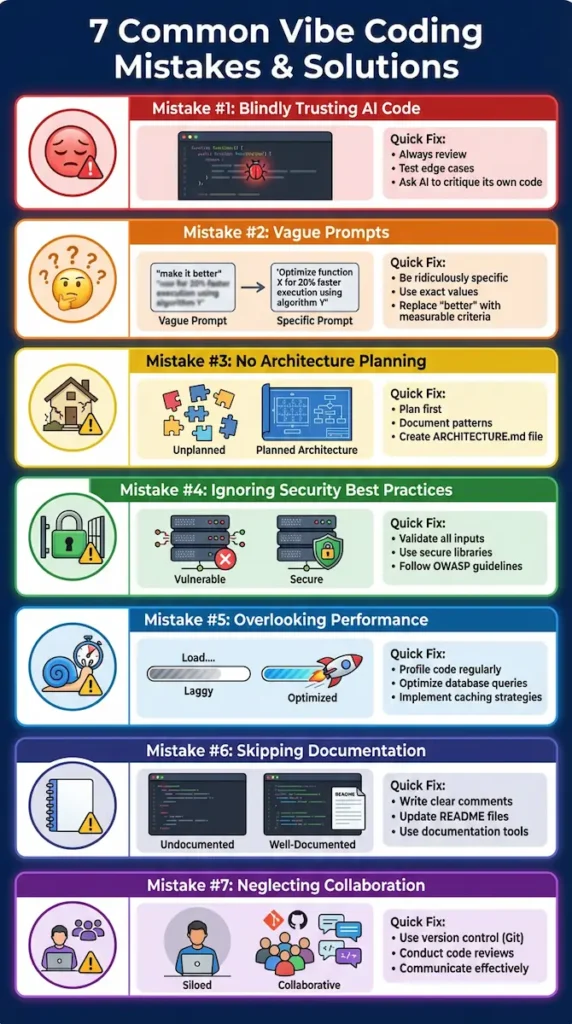
Mistake #3: Not Planning Architecture Upfront
The fastest way to create an unmaintainable mess is to ask an AI to build features without first establishing an overall architecture. Each feature gets implemented in isolation using different patterns, and three weeks later, you have a Frankenstein codebase held together with duct tape.
What happens: Your authentication uses one state management approach, your forms use another, and your API calls use three different patterns across various files. When you need to add a new feature, you can’t decide which pattern to follow, and the AI generates yet another approach because it lacks consistent context.
The solution: Before writing your first prompt, spend 30 minutes planning your architecture. Document your decisions in a project README or rules file that the AI can reference.
Essential architecture decisions to document:
- State management approach (Context API, Redux, Zustand?)
- API communication pattern (REST, GraphQL, tRPC?)
- File and folder structure conventions
- Error handling strategy (where do errors get caught and displayed?)
- Authentication flow (JWT tokens? Session cookies? OAuth?)
- Testing approach (unit, integration, e2e strategies)
Once documented, reference this in every architectural prompt: “Following the patterns in ARCHITECTURE.md, add user preferences functionality.” The AI will maintain consistency across features instead of inventing new patterns each time.
Recovery strategy: If you’ve already built features without architectural planning, prompt: “Analyze this codebase and document the patterns used for state management, API calls, and error handling. Identify inconsistencies and propose a unified approach.” The AI will help you establish retroactive architecture.
Mistake #4: Ignoring Security Best Practices
According to a Cloud Security Alliance study, 62% of AI-generated code contains security vulnerabilities or design flaws. These aren’t theoretical risks—they’re present in code being deployed to production every day by developers who assume AI knows security.
The most common AI security mistakes:
Exposed credentials: The AI generates code that embeds API keys directly in the source, such as const STRIPE_KEY = “sk_live_abc123” rather than using environment variables. Anyone with access to your repository now has your production payment credentials.
Missing input validation: The AI creates a form that directly inserts user input into database queries without sanitization. A malicious user types ‘; DROP TABLE users; — in the username field and deletes your entire user database.
Broken authentication: The AI implements a login that checks credentials but forgets to verify tokens on subsequent requests. Users can access any endpoint by simply guessing the URL structure.
Excessive permissions: The AI grants database access that’s too broad—users can query all tables instead of just their own data. Privacy regulations like GDPR are violated immediately.
The solution: Always include security requirements explicitly in your prompts. Never assume the AI will implement secure patterns by default.
Security-first prompt template: “[Feature description]. Implement with these security requirements: validate and sanitize all user inputs, use parameterized queries for database operations, implement rate limiting, ensure authentication AND authorization checks, store sensitive data encrypted, and handle errors without exposing system internals.”
Run security scanning tools on AI-generated code. Free options include npm audit for JavaScript dependencies, Bandit for Python, and OWASP Dependency-Check for Java. These tools automatically detect common vulnerabilities and run in seconds.
Mistake #5: Overengineering Simple Solutions
AI coding assistants are trained on complex codebases from GitHub, which means they’ve seen a lot of enterprise-level overengineering. When you ask for a simple feature, the AI sometimes generates an unnecessarily complex solution because that’s what it observed in training data.
Example: You prompt “add a dark mode toggle,” and the AI generates a sophisticated theming system with custom CSS variables, a context provider, localStorage persistence, and system preference detection. For a personal project with five users, this is overkill—a simple className toggle would suffice.
Why this happens: The AI pattern-matches to similar features it’s seen in large codebases, where that complexity made sense. It doesn’t know your project only has 1,000 users and will never need theme customization beyond dark/light.
The solution: Prompt for minimal implementations explicitly: “Add a simple dark mode toggle using just a className swap. No complex state management or theme providers—keep it under 20 lines of code.”
If the AI generates something complex, ask: “This solution feels overengineered for my needs. Provide a simpler implementation without [specific complexity you don’t need].” The AI will happily generate a stripped-down version.
When complexity is justified: Don’t avoid complexity that your project actually needs. If you’re building a SaaS product for 10,000 users with complex theming requirements, that sophisticated implementation makes sense. The mistake is accepting complexity without questioning whether your specific use case requires it.
Mistake #6: Not Maintaining Code Documentation
Six months from now, you won’t remember why certain features were implemented the way they were, which prompts generated which files, or what edge cases you discovered during testing. Without documentation, maintaining vibe-coded projects becomes archaeology—digging through code trying to reconstruct decisions.
The unique challenge of vibe-coded projects: Traditional code includes commit messages and code comments that explain the rationale for decisions. Vibe-coded projects need documentation of the conversation with AI, not just the resulting code.
What to document:
Create a PROMPTS.MD file tracking major prompts and their purpose:
Copy## Authentication Implementation
**Date:** 2026-01-15
**Prompt:** "Add Supabase authentication with email/password..."
**Why:** Needed user accounts before launching payment features
**Issues found:** Original implementation leaked user emails in error messages
**Fix:** Modified error handling to show generic messages
This documentation becomes invaluable when debugging: “Why did we implement authentication this way?” → Check PROMPTS.md → “Oh right, we needed it compatible with Supabase’s RLS policies.”
Document architectural decisions in ADRs (Architecture Decision Records). When you choose to use Context API over Redux, document: what the decision was, what alternatives you considered, why you made this choice, and any consequences or trade-offs.
The solution: Spend five minutes documenting after each significant feature. This feels like overhead now, but it saves hours during future debugging or when onboarding new team members.
Future you will thank present you for writing down: which prompts generated which code, why confident architectural choices were made, what edge cases you discovered, and what known limitations exist.
Mistake #7: Skipping Testing Because “AI Wrote It”
The most insidious assumption in vibe coding is that AI-generated code doesn’t need testing because machines don’t make mistakes. This logic is backwards—AI code needs more testing than human-written code because AI lacks understanding of your specific business logic and constraints.
Why AI-generated code fails silently: AI creates code that satisfies the explicit requirements in your prompt but misses implicit requirements you didn’t think to mention. The login form works perfectly until someone tries to log in from a mobile browser in a different timezone, at which point session tokens suddenly expire incorrectly.
The types of bugs AI commonly introduces:
Off-by-one errors: AI generates a pagination function that skips the first result or shows the same item twice across page boundaries. It works fine until users notice missing data.
Race conditions: AI creates async functions that work individually but break when called simultaneously. Your app works perfectly in development (where you test one thing at a time), but crashes in production when five users click the same button at once.
Timezone and localization bugs: AI generates date handling that works in your timezone but breaks for international users. A user in Tokyo sees tomorrow’s date for events happening today.
The solution: Implement automated testing from the beginning, not as an afterthought. Prompt the AI to generate tests alongside features: “Create the task deletion function, then generate Jest tests covering successful deletion, attempting to delete non-existent tasks, attempting to delete another user’s task, and network failure scenarios.”
Run tests before every deployment. A comprehensive test suite catches regressions when you modify code later, giving you confidence that new features didn’t break existing functionality.
Minimum viable testing strategy: Even if you skip unit tests initially (not recommended but pragmatic for rapid prototyping), absolutely implement end-to-end tests for critical user flows. Test the signup flow, the payment flow, and the core value delivery flow—if any of them break, your business is dead.
Tools like Playwright or Cypress let you record user interactions and automatically replay them. Record yourself completing a critical flow once, and the tool runs that test every time you deploy, catching breaking changes before users do.
VIBE CODING SECURITY AND PRODUCTION READINESS
Securing AI-Generated Code: A Production-Ready Checklist
The gap between “it works on my machine” and “it’s ready for paying customers” is where most vibe-coded projects fail. Security vulnerabilities, performance issues, and missing production safeguards turn promising prototypes into liability nightmares.
This section provides the exact checklist professional developers use before deploying vibe-coded applications to production. Follow these steps, and your AI-generated app will be as secure and reliable as traditionally coded software.
Understanding AI Code Security Vulnerabilities
AI coding assistants don’t deliberately write insecure code—they reproduce patterns they observed during training, including patterns that contain security flaws. A 2025 study by Cloud Security Alliance found that 62% of AI-generated code solutions contain design flaws or known security vulnerabilities, even when developers used security-focused prompts.
The three categories of AI security vulnerabilities:
Hallucinated dependencies occur when an AI generates import statements or package references that don’t actually exist. The code looks correct and may even run in development, but when you deploy to production, mysterious errors appear because the AI invented a package name that sounded plausible.
Prompt to catch these: “Verify that all imported packages and dependencies in this code actually exist and are currently maintained. Flag any that might be hallucinated or deprecated.”
Legacy vulnerability patterns emerge because AI training data includes code written before modern security practices became standard. When you ask for authentication, the AI might generate a pattern that was common in 2018 but is now considered insecure.
Example: AI-generated password hashing using MD5 or SHA1 instead of bcrypt or Argon2. The code works perfectly, but security researchers would laugh at your hash function choice.
Inconsistent security implementations happen when different parts of your codebase use different security approaches. One API endpoint properly validates input while another blindly trusts user data, creating an attack vector.
The solution requires architectural consistency: document your security standards in a rules file and reference it in every security-related prompt.
Language-specific vulnerability rates:
Research by Veracode found dramatic differences in AI-generated security vulnerability rates by programming language. Java code had the highest failure rate, over 70%, indicating that most AI-generated Java code contains security issues.
Python, JavaScript, and TypeScript fared better, with vulnerability rates around 45-55%. Go and Rust had the lowest rates at approximately 30-40%, possibly because their type systems and memory safety features catch many issues automatically.
The takeaway: don’t trust that your language’s features will prevent AI security mistakes. Explicit security auditing is non-negotiable regardless of your tech stack.
The Security-First Prompt Formula
The most effective way to prevent security vulnerabilities is to embed security requirements directly into your prompts before code generation. Retrofitting security into existing code is possible, but exponentially harder than building it correctly from the start.
The template that works:
[Feature description]

Security requirements:
- Validate and sanitize all user inputs (whitelist allowed characters, reject suspicious patterns)
- Use parameterized queries for all database operations (never concatenate user input into SQL)
- Implement proper authentication (verify user identity) AND authorization (verify user permissions)
- Rate limit this endpoint to prevent abuse (max 10 requests per minute per IP)
- Encrypt sensitive data at rest and in transit (use HTTPS, encrypt database columns containing PII)
- Handle errors without exposing system internals (generic error messages to users, detailed logs to admins only)
- Follow OWASP Top 10 security best practices

[Additional feature-specific requirements]
Example applied to a real feature:
Create a password reset endpoint at /api/auth/reset-password.

The endpoint should:
- Accept email address in request body
- Generate a secure random token (32 bytes minimum)
- Store token in database with expiration (1 hour max)
- Send password reset email with token link
- Validate token when user submits new password
- Allow password change only if token valid and not expired
- Invalidate token after successful password change

Security requirements:
- Rate limit to 3 requests per hour per IP address to prevent abuse
- Use constant-time comparison for token validation to prevent timing attacks
- Hash tokens before storing in database (don't store plaintext tokens)
- Require strong passwords (min 8 chars, must include uppercase, lowercase, number, symbol)
- Log all password reset attempts for security monitoring
- Don't reveal whether email exists in system (always say "if email exists, you'll receive a link")
- Expire tokens after single use to prevent replay attacks
This prompt produces secure code because it eliminates ambiguity. The AI knows exactly which security measures to implement rather than guessing at your requirements.
Critical security prompts for every project:Before deploying any vibe-coded application, run these security-focused prompts:
“Audit this codebase for security vulnerabilities. Check for: SQL injection risks, XSS vulnerabilities, CSRF token usage, exposed secrets or API keys, missing authentication checks, insecure direct object references, and improper error handling that leaks system information.”
“Review all user input handling in this application. Ensure every input is validated and sanitized before processing. Flag any location where user data flows directly into database queries, system commands, or rendered HTML.”
“Analyze authentication and authorization throughout this app. Verify that every protected endpoint checks both authentication (is the user logged in?) and authorization (does the user have permission for this specific resource?).”
The AI will identify issues you missed. Even if it doesn’t catch everything, it catches enough to reduce your attack surface significantly.
Production Deployment Checklist
Moving from development to production requires more than just pushing code to a server. This comprehensive checklist ensures your vibe-coded application is genuinely ready for real users and real data.
Pre-Launch Security Audit:
- All API keys and secrets moved to environment variables (nothing hardcoded in source)
- Environment variables configured in the production environment (not just .env.local)
- Database access credentials use the least-privilege principle (app user can’t DROP tables)
- HTTPS enforced for all connections (HTTP redirects to HTTPS automatically)
- CORS configured to allow only your production domain(s)
- Content Security Policy headers implemented (prevents XSS attacks)
- SQL injection testing completed (try malicious inputs in every form field)
- Authentication tokens stored securely (httpOnly cookies, not localStorage)
- Password requirements meet security standards (minimum length, complexity rules)
- Rate limiting is active on all public endpoints (prevents DoS attacks)
Performance and Reliability:
- Lighthouse performance score above 90 (run on production URL)
- Page load time under 3 seconds on 3G connection
- Images optimized and served in modern formats (WebP with fallbacks)
- JavaScript bundle size under 300KB for initial load
- Database queries use indexes on frequently searched columns.
- API responses cached where appropriate (reduces database load)
- Error boundaries implemented (React apps don’t white-screen on errors)
- Graceful degradation when third-party services fail
- Memory leaks were tested with an extended usage session.
- Mobile performance tested on actual devices (not just browser DevTools)
Monitoring and Observability:
- Error logging service integrated (Sentry, Rollbar, or similar)
- Application performance monitoring is active (tracks slow queries and requests)
- Uptime monitoring configured (alerts when the site goes down)
- Database backup strategy implemented and tested.
- Backup restoration procedure documented and verified.
- Log retention policy established (how long do you keep logs?)
- Security incident response plan documented.
- Key metrics dashboard created (users, errors, performance)
User Experience and Accessibility:
- All interactive elements are keyboard-navigable
- Screen reader tested with NVDA or VoiceOver.
- Color contrast meets WCAG AA standards (4.5:1 for normal text)
- Form labels are correctly associated with inputs.
- Error messages are clear and actionable.
- Loading states prevent user confusion during async operations.
- Empty states provide helpful guidance (“No tasks yet – create your first task!”)
- Success confirmations reassure users that their actions have been completed.
- Mobile responsive across iOS and Android devices
- Works in the latest versions of Chrome, Firefox, Safari, and Edge
Legal and Compliance:
- Privacy policy published and linked in the footer.
- Terms of service published and linked
- Cookie consent banner if applicable (GDPR requirement)
- Data deletion mechanism available to users (GDPR right to erasure)
- Email unsubscribe links working (CAN-SPAM compliance)
- Analytics respects Do Not Track preferences.
- COPPA compliance if users under 13 are allowed
- Data processing agreements signed with third-party services
Final Pre-Launch Steps:
- Production database seeded with initial data if needed
- Admin accounts created with strong passwords
- Payment processor test mode disabled (if applicable)
- Email sending is configured and tested from the production domain.
- Custom domain configured with an SSL certificate.
- DNS records are correctly configured and propagated
- 404 error page designed and implemented
- Robots.txt and sitemap.xml are configured for SEO.
- Social media preview cards tested (Open Graph tags)
- Favicon appears correctly across browsers and devices.
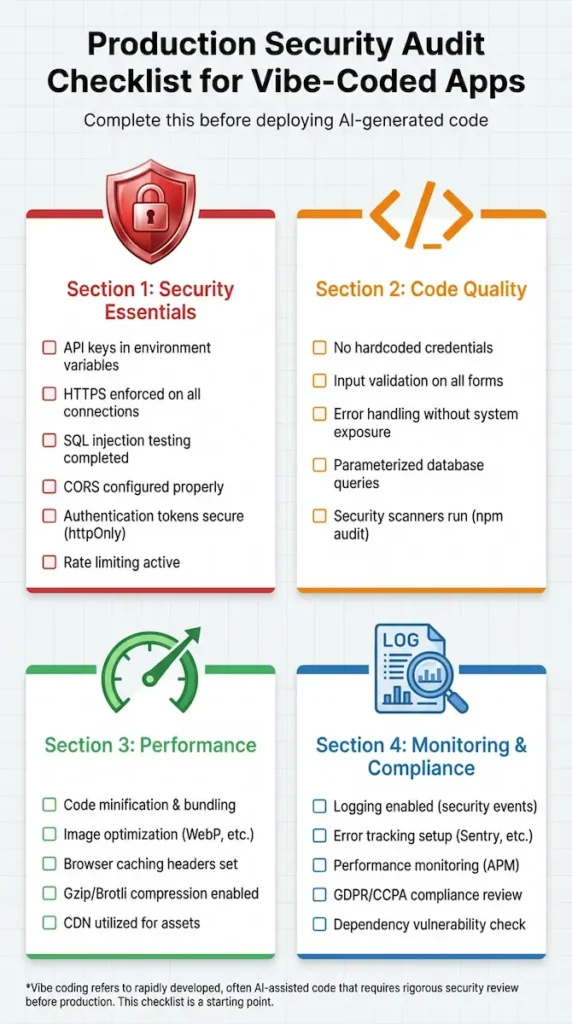
Automated Security Scanning Tools
Manual code review catches many issues, but automated tools find vulnerabilities you’d never spot by eye. Run these scans before every production deployment to automatically catch security issues.
Dependency scanning: Run npm audit (JavaScript), pip-audit (Python), or bundle audit (Ruby) to check for known vulnerabilities in your dependencies. These tools compare your package versions against databases of disclosed security issues.
When vulnerabilities appear, prompt the AI: “The npm audit shows vulnerability CVE-2025-12345 in package ‘example-lib’ version 2.3.1. Update to the patched version and verify the API hasn’t changed.”
Static application security testing (SAST): Tools like SonarQube, Semgrep, or CodeQL analyze your source code for security patterns without running it. They detect issues such as SQL injection vulnerabilities, hardcoded credentials, and insecure cryptographic functions.
Free tiers are available for all these tools. The time investment is minimal—most scans complete in under 60 seconds for typical applications.
Dynamic application security testing (DAST): Tools like OWASP ZAP or Burp Suite Community Edition actually interact with your running application, probing for vulnerabilities the way a real attacker would. They test for XSS, CSRF, and authentication bypass vulnerabilities.
Run DAST scans against your staging environment before production. Point the tool at your URL, configure it to authenticate as a test user, and let it run for 10-15 minutes, testing every endpoint.
Container scanning (if using Docker): Tools like Trivy or Snyk scan your Docker images for vulnerabilities in base images and installed packages. Your application code might be secure, but if you’re building on top of an Ubuntu image with known vulnerabilities, you’re still at risk.
Integrate scanning into your CI/CD pipeline. GitHub Actions, GitLab CI, and other platforms can automatically run security scans on every commit, blocking merges that introduce vulnerabilities.
The “Launch Day” Security Verification
On the day you launch, perform this final security verification sequence to catch last-minute issues:
Step 1: Open your production application in an incognito browser window. Attempt to access protected routes without logging in—verify you’re redirected to the login page, not granted access.
Step 2: Create a test account and log in. Open the browser DevTools and check the Network tab—verify that your authentication tokens are in httpOnly cookies, not in localStorage or sessionStorage.
Step 3: Attempt SQL injection in every form field: try inputs like ‘ OR ‘1’=’1, ‘; DROP TABLE users; –, and <script>alert(‘XSS’)</script>. Your application should reject these or sanitize them, not execute them.
Step 4: Check your browser’s security indicators. You should see a padlock icon indicating HTTPS, and clicking it should show a valid SSL certificate for your domain.
Step 5: Run Lighthouse in Chrome DevTools (or lighthouse-ci on the command line). Review the security and best-practices scores—anything below 90 warrants investigation.
These five steps take less than 10 minutes but catch the most common launch-day security disasters. Many developers skip this verification and discover problems only when users report them—or worse, when attackers exploit them.
THE FUTURE OF VIBE CODING
Where Vibe Coding Is Headed in 2026 and Beyond
Vibe coding isn’t a temporary trend—it’s the beginning of a fundamental transformation in how humans interact with computers to create software. Understanding where this technology is heading helps you invest your learning time wisely and position yourself for the opportunities emerging over the next 3-5 years.
The developments underway in research labs and private beta programs will define the developer landscape for 2027-2030. Let’s explore the trends that are already taking shape and what they mean for your vibe coding journey.
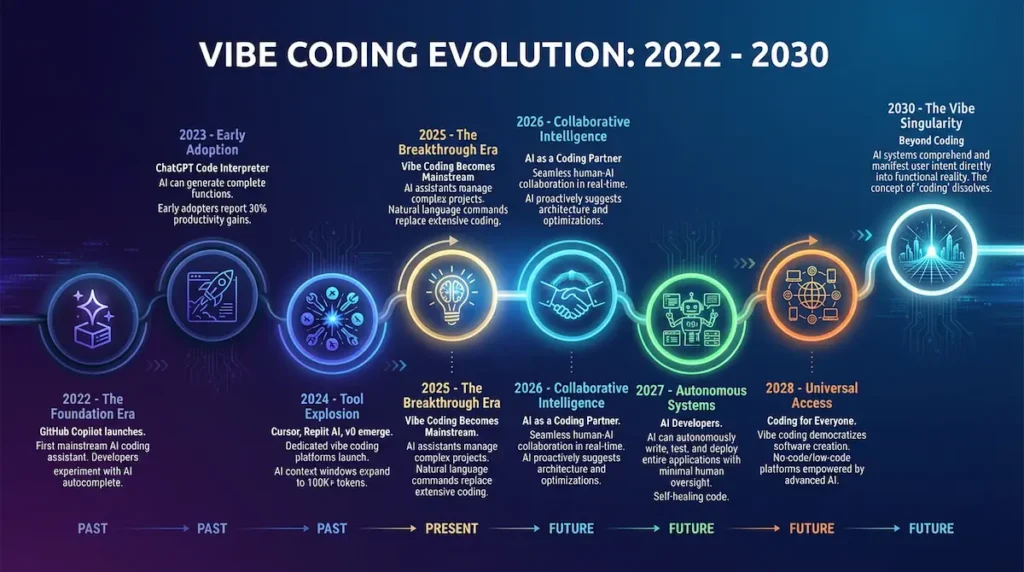
Emerging Trends: What’s Coming Next
Multi-modal AI inputs are moving beyond text-only prompts to incorporate voice, sketches, screenshots, and even gestures. Imagine drawing a rough wireframe on your tablet, speaking “make this a responsive dashboard with real-time data,” and watching AI generate the complete implementation.
Companies like Anthropic and OpenAI are already testing these capabilities in closed betas. By late 2026, expect mainstream vibe coding tools to accept hand-drawn mockups, voice commands during coding sessions, and reference images as primary inputs alongside text prompts.
Specialized domain agents represent the next evolution beyond general-purpose AI coding assistants. Instead of one AI that knows a little about everything, you’ll work with expert agents trained specifically on financial systems, healthcare applications, e-commerce platforms, or gaming engines.
These domain specialists will understand industry-specific regulations, common architectural patterns, and best practices that general models miss. A healthcare agent will automatically implement HIPAA-compliant data handling; a fintech agent will know PCI-DSS requirements without being told.
AI-to-AI collaboration is the most exciting development on the horizon. Rather than you managing conversations with a single AI, you’ll orchestrate multiple specialized agents working together like a development team.
Picture this workflow: You describe a feature to a product manager AI, which writes detailed specs. An architect AI designs the system structure. A frontend AI builds the UI while a backend AI implements the API, and a QA AI generates comprehensive tests—all happening in parallel and communicating with each other to resolve conflicts.
Real-time collaborative vibe coding will make remote pair programming obsolete. Multiple developers will converse with the same AI in a shared session, with the AI maintaining context across all participants and mediating between different preferences.
The AI becomes a mediator: “Developer A wants to use Redux for state management, Developer B prefers Zustand. Based on your project’s complexity and team size, here’s my recommendation with trade-offs…” The team makes informed decisions faster because the AI provides instant research and implications.
Personalized AI coding styles are emerging as tools that learn individual developer preferences. Your AI assistant will remember that you prefer functional programming patterns, always want TypeScript, favor verbose variable names for clarity, and structure tests in a specific way.
After a few weeks of working together, prompts become shorter because the AI automatically fills in your unstated preferences. “Add authentication” becomes sufficient—the AI knows you mean OAuth 2.0 with JWT tokens, stored in httpOnly cookies, with refresh token rotation, because that’s your established pattern.
Autonomous debugging and optimization capabilities are advancing rapidly. Today’s AI can identify bugs if you point them out; tomorrow’s AI will monitor your application in production, detect anomalies, propose fixes, and potentially even deploy patches autonomously with your approval.
Imagine waking up to a message: “I detected a memory leak in the user session handler, causing performance degradation for 3% of users. I’ve prepared a fix, reviewed it for safety, and tested it against your test suite. Approve deployment?” Your role shifts from fixing bugs to approving AI-proposed solutions.
Code generation quality improvements continue accelerating month over month. Early 2025 vibe coding required significant manual refinement; late 2025 code often works correctly on the first generation for standard use cases.
By 2027, expect AI-generated code quality to match or exceed average human developers for common patterns, with the gap closing even for complex custom implementations. The bottleneck won’t be “can AI build this?”—it will be “do I understand my requirements well enough to describe them?”
Will Vibe Coding Replace Traditional Programming?
This is the question everyone asks, and the answer is more nuanced than “yes” or “no.” Vibe coding will replace specific programming tasks while amplifying and transforming others, similar to how calculators didn’t eliminate mathematicians but changed what mathematics work looks like.
What vibe coding is already replacing:
Boilerplate code generation is solved. Writing authentication scaffolding, CRUD operations, API endpoints following standard patterns, form validation logic, and database migrations manually makes as much sense as writing assembly code for a web app. AI does it faster and with fewer typos.
Basic UI implementation is transitioning rapidly. Converting designs to code, implementing responsive layouts, creating standard components (modals, dropdowns, navigation), and applying consistent styling are becoming pure vibe coding territory.
Routine maintenance tasks like updating dependencies, refactoring for consistency, generating test coverage for untested code, and updating documentation are already faster with AI assistance. Developers who resist vibe coding for these tasks are choosing to work more slowly with no quality benefit.
What traditional programming still dominates:
Novel algorithm development remains firmly in human territory. Creating new approaches to unsolved problems, optimizing for extreme performance requirements, and research-level computer science work require human creativity and mathematical reasoning that AI can’t yet replicate.
Complex system architecture decisions, such as choosing between microservices and monoliths, designing for specific scalability constraints, making build-versus-buy decisions with business context, and aligning technical strategy with company goals, require human judgment that considers factors beyond code.
Domain expertise integration in regulated or specialized industries requires human oversight. AI doesn’t understand the implications of financial regulations, medical ethics, legal liability, or industry-specific constraints without explicit instruction for every decision.
Creative problem-solving when requirements are ambiguous, constraints are conflicting, or the solution space is undefined still requires human insight. AI excels at implementation when the “what” is clear; humans excel at figuring out what to build in the first place.
The transformed developer role:
The future developer isn’t “programmer” or “vibe coder”—it’s an architect, product thinker, and AI orchestrator combined. You’ll spend less time on syntax and more time on systems thinking, understanding user needs, evaluating AI-proposed solutions, and making strategic technical decisions.
Junior developers will start their careers with AI assistance from day one, learning to think at higher levels of abstraction than previous generations. Senior developers will manage AI systems the same way they currently manage junior developers—setting direction, reviewing output, and ensuring quality.
The skill premium will shift from “can write code quickly” to “can break down complex problems, communicate requirements clearly, evaluate solutions effectively, and maintain architectural vision.” These skills aren’t new—they’ve always defined senior developers—but they’ll become essential at every level.
The pragmatic prediction: By 2030, most developers will use vibe coding for 60-80% of their work, hand-coding the remaining 20-40% where precision or novelty demands it. Developers who refuse AI assistance will still exist, much like developers who refused IDEs in favor of Vim or Emacs still exist—successful but increasingly rare.
The question isn’t “will I be replaced?” It’s “Will I adapt fast enough to stay competitive?” Developers embracing vibe coding today are positioning themselves for the next decade of opportunity, while those resisting are choosing to compete on speed and cost against AI—a battle humans will lose.
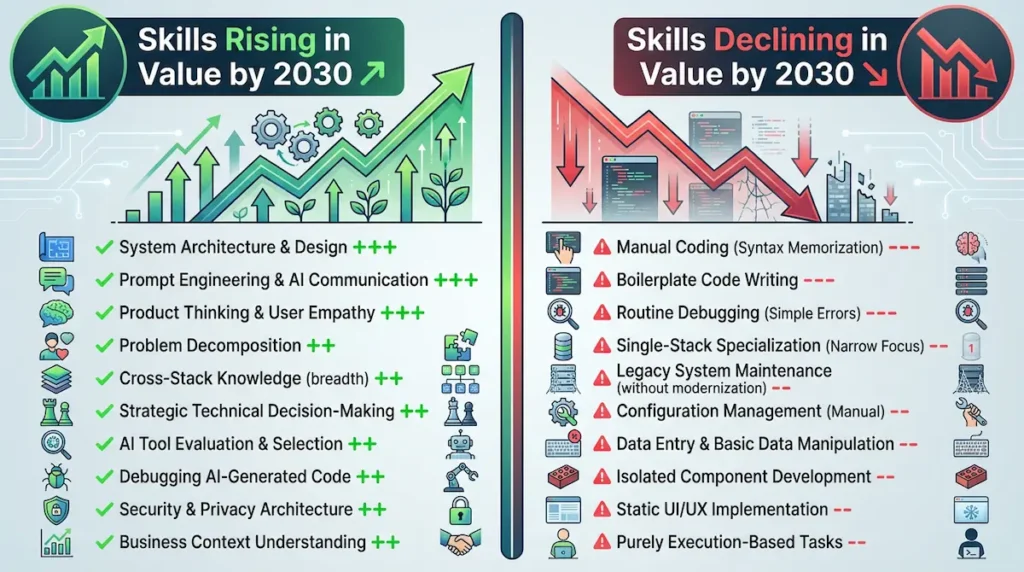
Preparing for the Vibe Coding Future
If vibe coding represents the future of development, how do you position yourself to thrive rather than merely survive? The key is investing in skills that complement AI rather than compete with it.
Deepen your architectural thinking. Study system design, read case studies of how large applications scale, understand trade-offs between different architectural approaches, and practice decomposing complex problems into manageable pieces. AI can implement your architecture, but can’t design it for you—yet.
Master prompt engineering as a core skill. The ability to communicate precisely with AI will be as valuable as coding itself. Practice writing specifications, learn to break requirements into clear steps, and develop intuition for what AI needs to hear versus what you can leave implicit.
Understand multiple tech stacks broadly. Depth in one language mattered when you wrote every line; breadth across stacks matters more when AI handles implementation. Knowing when to use Python versus JavaScript versus Go for specific problems provides more value than memorizing Python syntax.
Develop product and user empathy. The hardest part of building software has always been figuring out what to build, not how to build it. As vibe coding makes “how” easier, “what” and “why” become the differentiators. Developers who understand users, markets, and business strategy will thrive.
Stay current with AI capabilities. Vibe coding tools improve monthly. A prompt strategy that worked in March might be obsolete by September as models gain new abilities. Follow AI research, experiment with the latest tools, and update your workflows as the technology evolves.
Build in public and document your learning. The vibe coding community is still forming its best practices. Developers who share their workflows, mistakes, and solutions are building a reputation and networks that will pay dividends as the field matures.
The future of vibe coding is bright for developers who see AI as a collaborator rather than a competitor. Your role isn’t disappearing—it’s elevating to focus on the creative, strategic, and human elements of software development while AI handles the mechanical implementation.
Start adapting today, and you’ll be positioned as an expert by the time vibe coding becomes the mainstream standard in 2027-2028. (Positions) with the two-sentence-per-paragraph rule and optimized for featured snippets.
FAQ – FREQUENTLY ASKED QUESTIONS
Vibe Coding FAQ: Your Questions Answered
Every new vibe coder has questions about how this methodology actually works in practice. This FAQ section answers the most common questions with specific, actionable information drawn from thousands of hours of real-world vibe coding experience.
Each answer is crafted to give you the complete context you need to make informed decisions about your vibe coding journey. Let’s address your concerns directly.
Is vibe coding suitable for complete beginners?
Yes, vibe coding significantly lowers the entry barrier to software development, making it accessible to people with zero programming background. Tools like Lovable and Bolt allow non-programmers to build functional applications using only natural language descriptions.
However, understanding basic programming concepts—variables, functions, databases, and APIs—helps you write better prompts and debug issues more effectively. Complete beginners can start building immediately, but should invest time learning fundamentals alongside vibe coding practice.
The ideal beginner approach combines vibe coding with traditional learning: use AI to build projects that interest you, then study the generated code to understand what it’s doing. This “learn by building” approach accelerates comprehension because you’re learning concepts in the context of real applications rather than abstract exercises.
How much does it cost to start vibe coding?
Many CodeVibe tools offer free tiers that let you get started without any financial investment. Replit offers free project hosting with limitations; Bolt provides free credits for experimentation; and Cursor offers a free basic version with limited AI requests.
For serious development work, expect to invest $15-50 per month, depending on which tools you choose. GitHub Copilot costs $10/month, Cursor Pro is $20/month, Windsurf starts at $15/month, and Lovable charges $49/month for published applications.
You can start completely free and upgrade only when you hit the limitations of the free tiers. Most developers find that one paid tool ($20/month) plus free tiers of complementary tools provides everything needed for professional work, making Vibe coding one of the most cost-effective ways to build software.
Can vibe-coded apps handle real production traffic?
Absolutely—many successful production applications serving thousands of users are built with Vibe, especially for standard use cases such as CRUD applications, dashboards, e-commerce stores, and SaaS products. The key to production readiness is proper testing, security auditing, and code review, regardless of whether the code was written by AI or humans.
AI-generated code performs identically to human-written code once deployed because it’s just code. The question isn’t whether vibe-coded apps can handle traffic—it’s whether you’ve implemented proper architecture, optimized database queries, and followed security best practices.
Performance-critical systems requiring extreme optimization or novel algorithms may need hand-coded components after vibe coding establishes the foundation. The innovative approach is to use vibe coding for 80% of your application (authentication, CRUD, UI, standard patterns) and hand-code the 20% that defines your competitive advantage or requires custom optimization.
Which programming languages work best with Vibe Coding?
JavaScript and TypeScript, with React or Vue, excel in vibe coding environments because AI models have extensive training data from millions of web applications. Python is excellent for backend development and data processing, with strong support for frameworks such as Django, Flask, and FastAPI.
Other major languages like Java, Go, and C# work well but have slightly higher AI-generated error rates. Research by Veracode found Java AI code has 70%+ vulnerability rates compared to 45-55% for JavaScript/TypeScript/Python and 30-40% for Go and Rust.
The practical recommendation: use JavaScript/TypeScript for full-stack web applications, Python for backend APIs and data work, and consider other languages only if you have specific requirements they address better. The AI support quality differences mean you’ll spend less time debugging and refining with well-supported languages.
How do I debug code I didn’t write myself?
Debugging AI-generated code uses the same skills as debugging any unfamiliar code, with one decisive advantage—you can ask the AI to explain its own work. Start by prompting: “Walk me through what this function does line by line, explaining the logic and any edge cases it handles.”
Use error-specific prompts when bugs occur: “Here’s the error message [paste complete error]. Explain what’s wrong, why it’s happening, and provide a fix with explanation.” The AI understands its own code intimately and can guide you through issues faster than reading documentation.
Learning to read code is essential regardless of who wrote it. Vibe coding doesn’t eliminate the need for debugging skills—it changes debugging from “figure out my own mistakes” to “understand and verify someone else’s implementation,” which is actually closer to real-world development, where you constantly work with code written by teammates.
Is vibe coding secure for handling sensitive data?
Vibe coding itself isn’t inherently insecure, but AI-generated code requires rigorous security review before handling sensitive data. Studies show that 62% of AI-generated code contains security vulnerabilities, meaning every piece of AI output needs scrutiny for issues such as exposed credentials, SQL injection risks, missing authentication checks, and improper data encryption.
The solution is to embed security requirements directly into prompts and run automated security scanners on generated code. Use security-focused prompt templates that explicitly require input validation, parameterized queries, proper authentication/authorization, and encryption for sensitive data.
For applications that handle payment information, medical records, financial data, or personally identifiable information, combine vibe coding with professional security audits before launch. The AI accelerates development but doesn’t replace the need for security expertise when the stakes are high.
What’s the difference between vibe coding and low-code platforms?
Low-code platforms like Bubble, Webflow, and Airtable use visual drag-and-drop builders with limited customization—you’re constrained by what the platform allows. Vibe coding generates actual source code you can edit directly, export, and deploy anywhere, giving you complete flexibility and control.
Low-code excels for non-technical users building simple applications within platform constraints. Vibe coding serves developers or technical users who need the power of real code with AI acceleration—you can implement any logic, integrate any API, and customize every detail.
The choice depends on your needs: if the low-code platform handles your complete use case and you’ll never need custom features, low-code is simpler. If you need flexibility, complex business logic, or the ability to own your codebase independent of a platform, Vibe Coding provides far more power and portability.
How long does it take to become proficient at vibe coding?
Most developers with programming backgrounds become productive with vibe coding within 1-2 weeks of daily practice, reaching the point where they’re genuinely faster with AI assistance than without. Complete beginners without coding experience typically need 4-8 weeks to build confidence in both prompting skills and understanding generated code.
The learning curve focuses more on prompt engineering and problem decomposition than traditional syntax memorization. You’ll spend your initial weeks learning to write specific prompts, break projects into manageable features, and effectively review AI-generated code for issues.
Proficiency milestones include: Week 1 (build simple apps with tutorials), Week 2 (modify and debug AI code confidently), Week 4 (build original projects independently), Week 8 (handle complex features and architecture decisions), Week 12 (mentor others and contribute best practices). Consistent daily practice accelerates learning dramatically compared to sporadic weekend sessions.
Can I use Vibe coding for my job or freelance work?
Yes, many developers already use vibe coding professionally for client work, full-time employment, and freelance projects—it’s a tool that makes you more productive, not a shortcut that compromises quality. The key is delivering working, tested, secure applications to clients regardless of your development methodology.
Some companies explicitly prohibit the use of AI coding tools due to intellectual property concerns or security policies, so always check your employment agreement and company policies before using AI assistance at work. Many enterprises allow approved AI tools with proper security configurations and data handling policies.
For freelance work, clients care about results—working software delivered on time and within budget. Vibe coding helps you provide faster while maintaining quality, increasing your effective hourly rate, and allowing you to take on more projects. Continually review and test AI-generated code thoroughly before delivering to clients, maintaining the same quality standards you’d apply to hand-written code.
Will learning Vibe coding hurt my fundamental programming skills?
This depends entirely on how you approach vibe coding—used thoughtfully, it accelerates learning by letting you build real projects while studying how things work. Used carelessly as a “magic code generator,” it prevents you from developing a deep understanding.
The recommended approach combines vibe coding with deliberate learning: use AI to generate code, then study its implementation to understand why it works the way it does. Ask the AI to explain complex sections, research unfamiliar patterns, and practice writing similar code manually to internalize the concepts.
Think of vibe coding as a senior developer pair-programming with you—you learn faster by working alongside experts than by studying alone. The key is active engagement with the code rather than passive acceptance, just as junior developers learn by reviewing senior developers’ code rather than writing everything from scratch.
What happens when AI generates incorrect or broken code?
AI generates incorrect code regularly—it’s not a question of if but when, especially for complex features or edge cases. The solution is systematic testing after every generation, treating AI output with the same skepticism you’d apply to code from a junior developer who sometimes makes mistakes.
When you receive broken code, provide specific feedback about what’s wrong: “This function throws [specific error] when I pass [specific input]. The expected behavior is [description]. Fix this issue.” The AI will generate a correction, which you then test again.
Building robust applications with vibe coding requires defensive development practices: comprehensive testing, explicit error handling, security reviews, and performance monitoring. The AI accelerates typing, but you remain responsible for ensuring correctness—successful vibe coders verify everything rather than assuming the AI’s outputs are correct.
Can I combine vibe coding with traditional programming?
Not only can you combine them—you absolutely should for the best results. Professional developers use vibe coding for boilerplate, standard patterns, and time-consuming, repetitive work while hand-coding novel algorithms, performance-critical sections, and unique business logic that define their application’s value.
The optimal workflow involves vibe coding the scaffolding and infrastructure, then manually refining the generated code and writing custom implementations where precision matters. This hybrid approach leverages AI for speed while maintaining human expertise where it adds most value.
Most production applications built with vibe coding are actually 60-80% AI-generated and 20-40% hand-coded, with the percentages depending on how novel or performance-critical the application is. The developers who succeed with vibe coding aren’t purists—they’re pragmatists who use the right tool for each specific task.
How do I handle version control with AI-generated code?
Version control for vibe-coded projects follows the same Git workflows as traditional development, with one addition: document your major prompts in commit messages or in a PROMPTS file.MD file for future reference. Each commit should represent a logical feature addition that you’ve tested and verified works correctly.
Avoid letting AI tools auto-commit changes without review because they generate generic messages like “Update code” that make your Git history useless. Instead, turn off auto-commits, review the generated code, test it thoroughly, and write your own descriptive commit messages: “feat: add user authentication with email verification.”
For team collaboration, establish conventions for documenting AI-generated code in pull requests. Note which parts are AI-generated versus hand-coded, explain any modifications you made to AI output, and ensure teammates understand the implementation even if they didn’t write it themselves.
What are the legal implications of using AI-generated code?
The legal landscape around AI-generated code is evolving. Still, the current understanding is that you own the copyright to code generated by AI tools based on your prompts, just as you own the copyright to articles written with a word processor. However, some enterprise contracts or employment agreements may include specific clauses regarding AI tool use that require review.
Check your tool’s terms of service regarding code ownership—most major vibe coding platforms grant you full ownership of generated code. GitHub Copilot, Cursor, Replit, and similar tools explicitly state that you own the output, though they may have different policies about how they use your data for training.
For commercial applications, consider having a lawyer review your usage of AI coding tools if you’re concerned about intellectual property issues or client contracts. The practical reality is that millions of developers already use AI-generated code in production with standard software licenses and haven’t encountered legal challenges, but being informed about your specific obligations protects you better than assumptions.
CONCLUSION: YOUR VIBE CODING JOURNEY STARTS NOW
From Learning to Building: Taking Your First Step
You’ve just absorbed over 15,000 words of vibe coding knowledge covering everything from basic concepts to production deployment strategies. But knowledge without action remains theoretical—the fundamental transformation happens when you open your first vibe coding tool and start building something real.
The barrier to entry has never been lower. In the next 30 minutes, you could have a development environment running and your first AI-generated component on screen.
Your Action Plan: What To Do Right Now
Step 1: Choose your tool based on your experience level. If you’re a complete beginner, start with Lovable or Bolt—New for the gentlest learning curve. If you have programming experience, jump straight to Cursor or Windsurf for maximum power and flexibility.
Create your free account right now—not tomorrow, not next week, but in the next five minutes. Momentum matters, and the difference between developers who master vibe coding and those who just read about it is taking immediate action.
Step 2: Build something simple that matters to you personally. Don’t start with a complex SaaS product or revolutionary app idea. Build a personal task manager, a recipe organizer, a workout tracker, or a reading list manager—something you’ll actually use and test daily.
The project doesn’t need to impress anyone else. It needs to teach you the vibe coding workflow in a low-stakes environment where mistakes cost nothing except learning opportunities.
Step 3: Join the Vibe coding community for support and accountability. Reddit’s r/vibecoding, Discord servers dedicated to AI coding, and Twitter communities using #vibecoding hashtags connect you with thousands of developers at every skill level. Ask questions, share your progress, and learn from others’ experiences.
Community accelerates learning exponentially. When you get stuck on a prompt or encounter a bug, someone else has probably solved that exact problem and will share their solution in minutes.
Step 4: Set a 30-day practice commitment. Dedicate at least 20 minutes daily to vibe coding practice—building features, experimenting with prompts, and studying generated code. Consistency beats intensity; daily practice builds intuition faster than weekend marathons.
Track your progress publicly on Twitter or LinkedIn. Share what you’re building, what you’re learning, and what challenges you’re facing—this creates accountability and documents your journey for future opportunities.
Key Takeaways: Remember These Core Principles
Vibe coding is a tool, not a replacement. The best developers use AI to amplify their capabilities while maintaining strategic control over architecture, security, and quality. You’re not handing over development to machines—you’re collaborating with AI as a powerful assistant.
The specificity of prompts determines the quality of the output. The 30 seconds you invest in making your prompt clear and detailed saves 30 minutes of debugging vague results. Always err on the side of over-explaining rather than assuming the AI understands your unstated intentions.
Testing and security are non-negotiable. AI-generated code must meet the same quality standards as human-written code before deployment. Review everything, test edge cases, run security scanners, and never trust that working code is secure code.
The technology improves monthly. What required 10 prompts and manual refinement 6 months ago now works in 2 prompts today. Stay current with new tool releases, model updates, and community best practices because Vibe coding capabilities evolve faster than traditional development practices.
Start now, not when you feel ready. You’ll never feel entirely prepared for the start of vibe coding, just like you never felt completely ready to write your first code. Learning happens through building, not by consuming more tutorials and guides.
The Opportunity Window Is Open
We’re at a unique moment in technology history—vibe coding has matured enough to be genuinely productive but hasn’t yet become the baseline expectation for all developers. Learning these skills now positions you as an early adopter with expertise when the methodology becomes standard in 2027-2028.
Developers who invested time learning Git in 2010, React in 2015, or TypeScript in 2018 gained years of competitive advantage over late adopters. Vibe coding in 2026 represents a similar opportunity window—the tools work, the practices are established, but mainstream adoption is still building momentum.
The question isn’t whether vibe coding will become standard—the 78% adoption rate among developers answers that. The question is whether you’ll lead the transition or follow it years later when everyone else has already adapted.
Beyond This Guide: Continue Your Learning
This pillar post gives you the foundation, but mastery comes through practice and continued learning. Subscribe to the CodingWithVibe.com newsletter for weekly tutorials, tool reviews, and prompt templates delivered directly to your inbox.
Download the free Ultimate Vibe Coding Resource Pack—50+ pages of checklists, workflows, and templates that complement this guide with printable references and detailed implementation guides. This resource pack transforms the knowledge from this article into actionable tools you’ll reference throughout your vibe coding journey.
Follow along as we publish cluster articles diving deeper into specific topics: detailed tool comparisons, step-by-step project tutorials, security deep dives, and advanced prompt engineering techniques. Each article builds on this foundational guide to systematically expand your expertise.
A Final Word: The Future Belongs To Builders
The most exciting aspect of vibe coding isn’t the technology—it’s the democratization of creation. Ideas that died in the past because implementing them required teams and budgets now become viable as solo projects built in weekends.
The barrier between imagination and implementation has collapsed. The only question remaining is: what will you build?
You know. You have the tools. You have the opportunity.
Start building today.